HubCoach, a Revenue Hub Latam product · Chrome extension and web app

Guidance inside every HubSpot record for teams in Chile and Latin America

HubCoach, a Revenue Hub Latam product, brings your team’s criteria to the HubSpot record where the work happens. It shows notices, articles, guided tours and action plans in a Side Panel next to the deal, contact or ticket. You start with 42 ready-made checks, add your team’s rules and decide what each person sees. People act in the HubSpot editor and save the change themselves: HubCoach never writes for anyone.

  • 42 checks ready to use
  • Never writes to HubSpot without the person
  • Spanish and English
  • Waitlist open
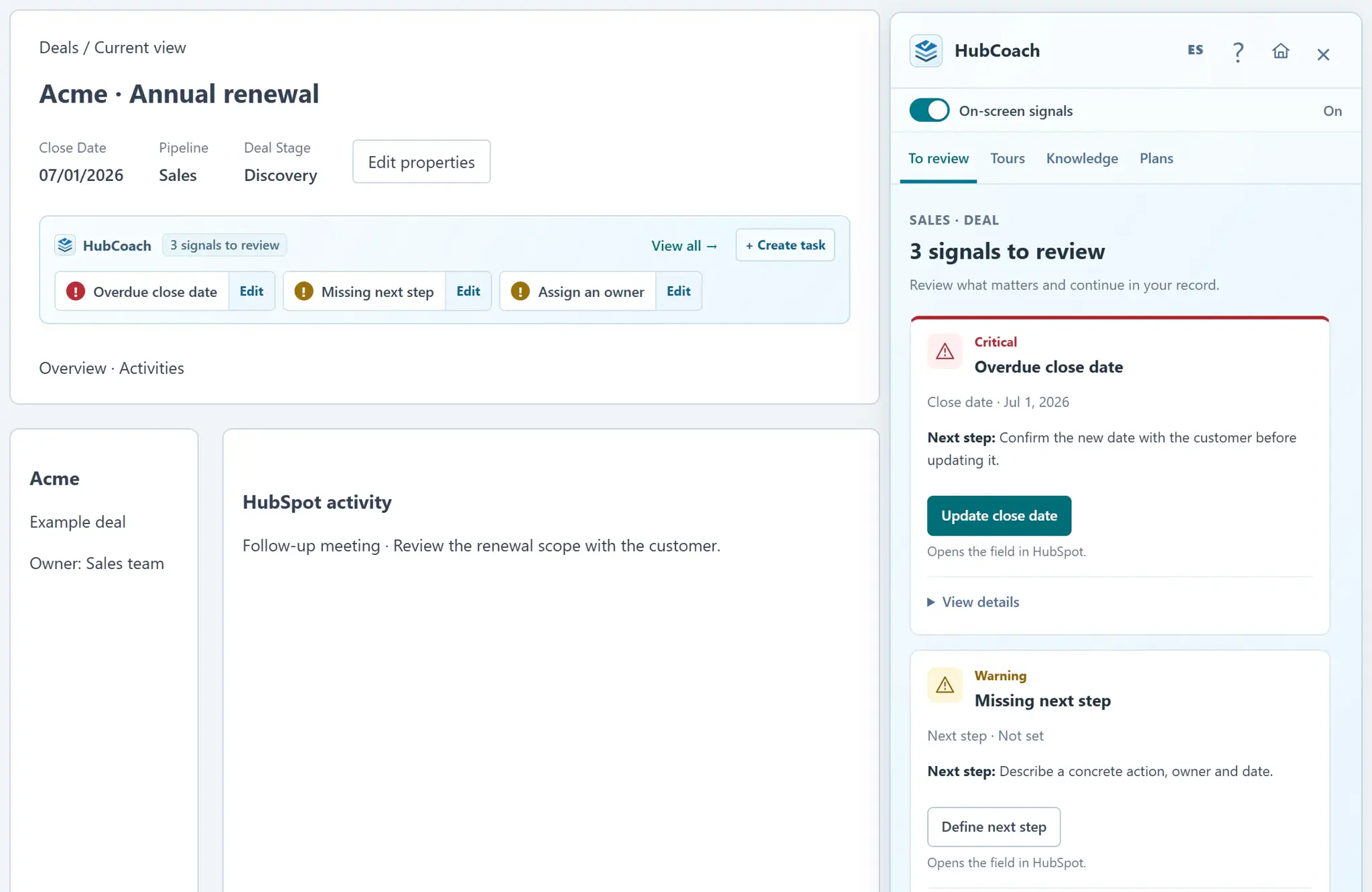
A HubSpot deal record with the HubCoach signal strip showing three signals to review, and the Side Panel open on the overdue close date and the missing next step
Team ruleDeals without a next step
Published
  • When it showsProposal sent with no Next step
  • What to doAgree on action, owner and date
  • Who sees itSales team
The person opens the field in HubSpot, fills it in and saves. HubCoach does not write for them.
A deal record with the HubCoach signal strip and Side Panel, with sample data.
What we see in teams using HubSpot

Does this happen in your HubSpot?

In sales and service teams across Chile and Latin America, the problem is rarely willingness. The criteria are just not where the decision happens.

  • The training ends and everyone goes back to filling fields their own way.

  • The next step says “follow up” and nobody else can pick up the deal.

  • At the handoff to service, the customer explains again what they had already agreed.

  • The same question arrives on chat for every record: what goes in this field?

HubCoach does not add another dashboard: it puts the agreed criteria next to the record, with an example and the action in HubSpot.
How it works

How does HubCoach work inside HubSpot?

Four steps. The team defines the criteria once and each person finds them where they work.

  1. 01Agree

    The team defines the criteria

    A rule, a process or an article: what to check, why it matters and a good example.

  2. 02Show

    HubCoach shows it on the record

    A strip and the Side Panel point out what is missing on the deal, contact or ticket.

  3. 03Act

    People act and save themselves

    HubCoach opens the native HubSpot editor. Nothing changes unless the person confirms it.

  4. 04Review

    Leaders coach with facts

    Action plans and boards to review real records with the team.

Rule, process, article or plan? Choose in the help center
What HubCoach looks like

What does each person see on the record?

Each view answers one question: what is missing, how it is done, what comes next and what the team agreed.

To review

What this record is missing

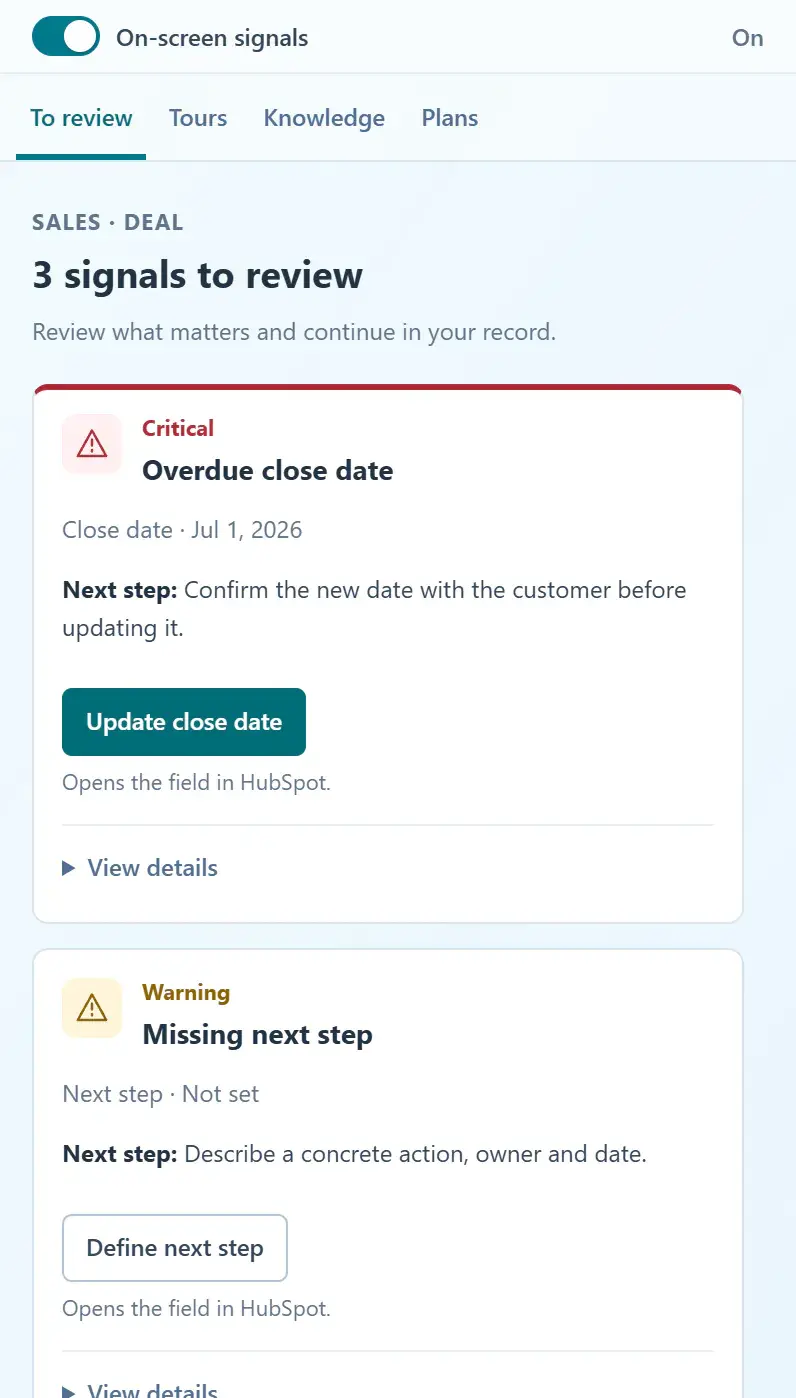
The Side Panel lists the deal’s signals, each with the next step and a button that opens the field in HubSpot.

  • Overdue close date, empty next step or missing owner.
  • The button opens the native HubSpot editor.
  • People correct, postpone or report a signal that does not apply.
Correct, postpone or report a signal
HubCoach Side Panel on the To review tab: three signals for the deal, each with the next step and a button that opens the field in HubSpot
Side Panel with a deal's signals, with sample data.
Knowledge

The answer next to the record

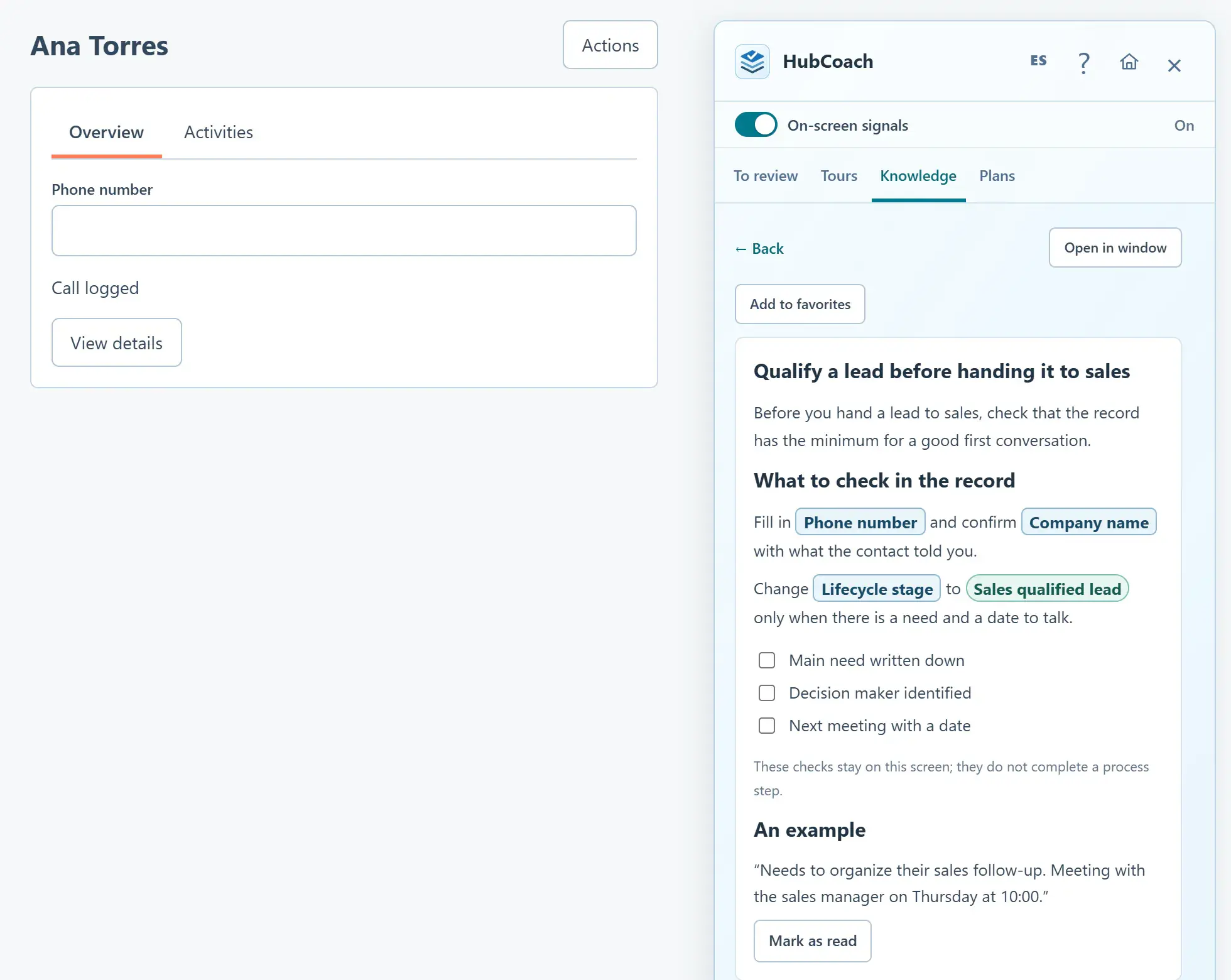
Team articles with real HubSpot fields in boxes, so people know exactly what to fill in.

  • Your portal’s fields and options, with their exact labels.
  • Suggestions based on the record you are viewing.
  • A Top 5 of the most-read content for new hires.
Use real HubSpot fields in an article
A Knowledge article open in the Side Panel next to a contact: real HubSpot fields such as Phone number and Lifecycle stage appear in boxes
An article with real HubSpot fields next to the record, with sample data.
Action plans

The assigned next step, on the record

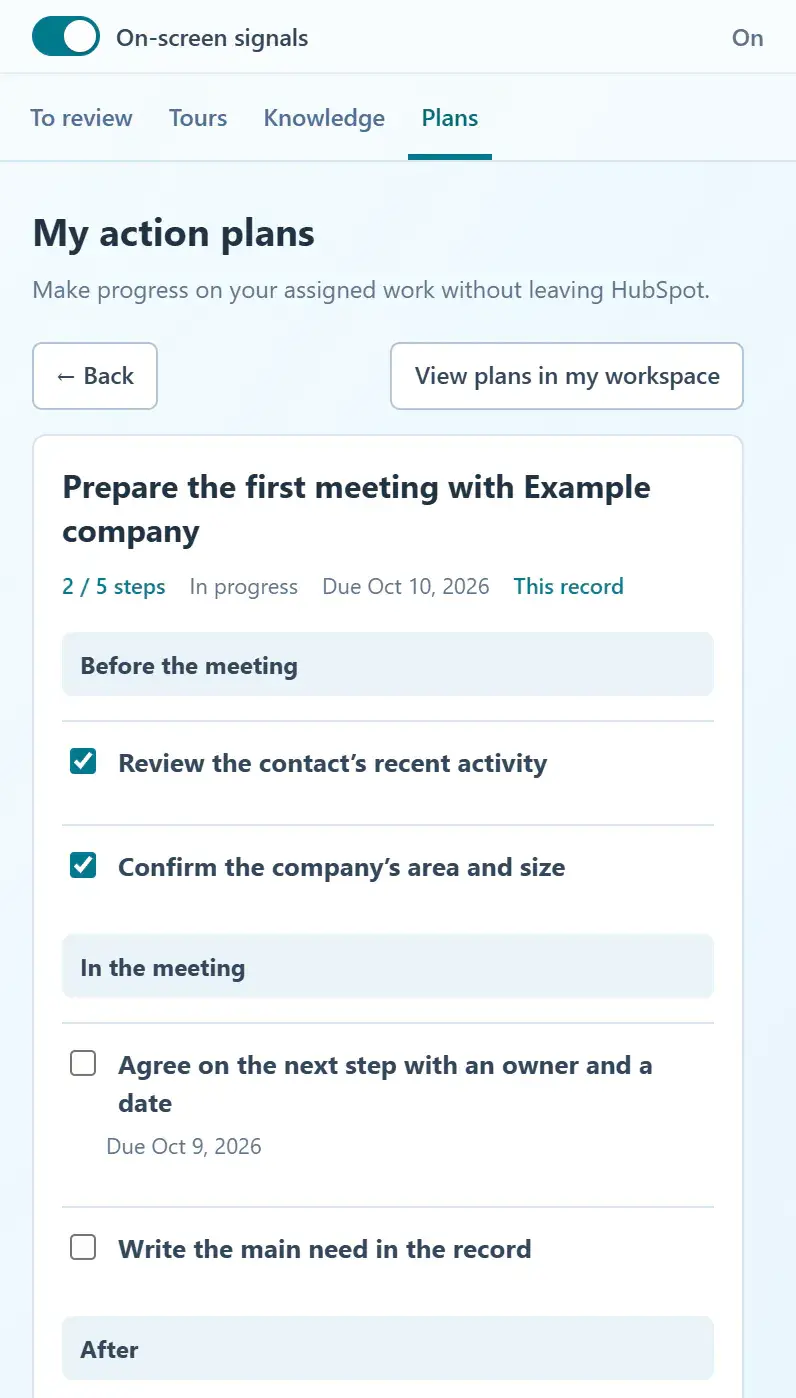
A leader assigns a plan with phases and dates. The person continues it from the deal they are working on.

  • Steps before, during and after a meeting.
  • Checking a step does not change HubSpot.
  • Leaders see progress and overdue steps.
Continue a plan from the record
An assigned action plan in the Side Panel: two steps done, the pending next step with its due date and the before, during and after phases of the meeting
A plan assigned to a record, with sample data.
Automatic signals

What do the 42 checks review, and who decides which stay on?

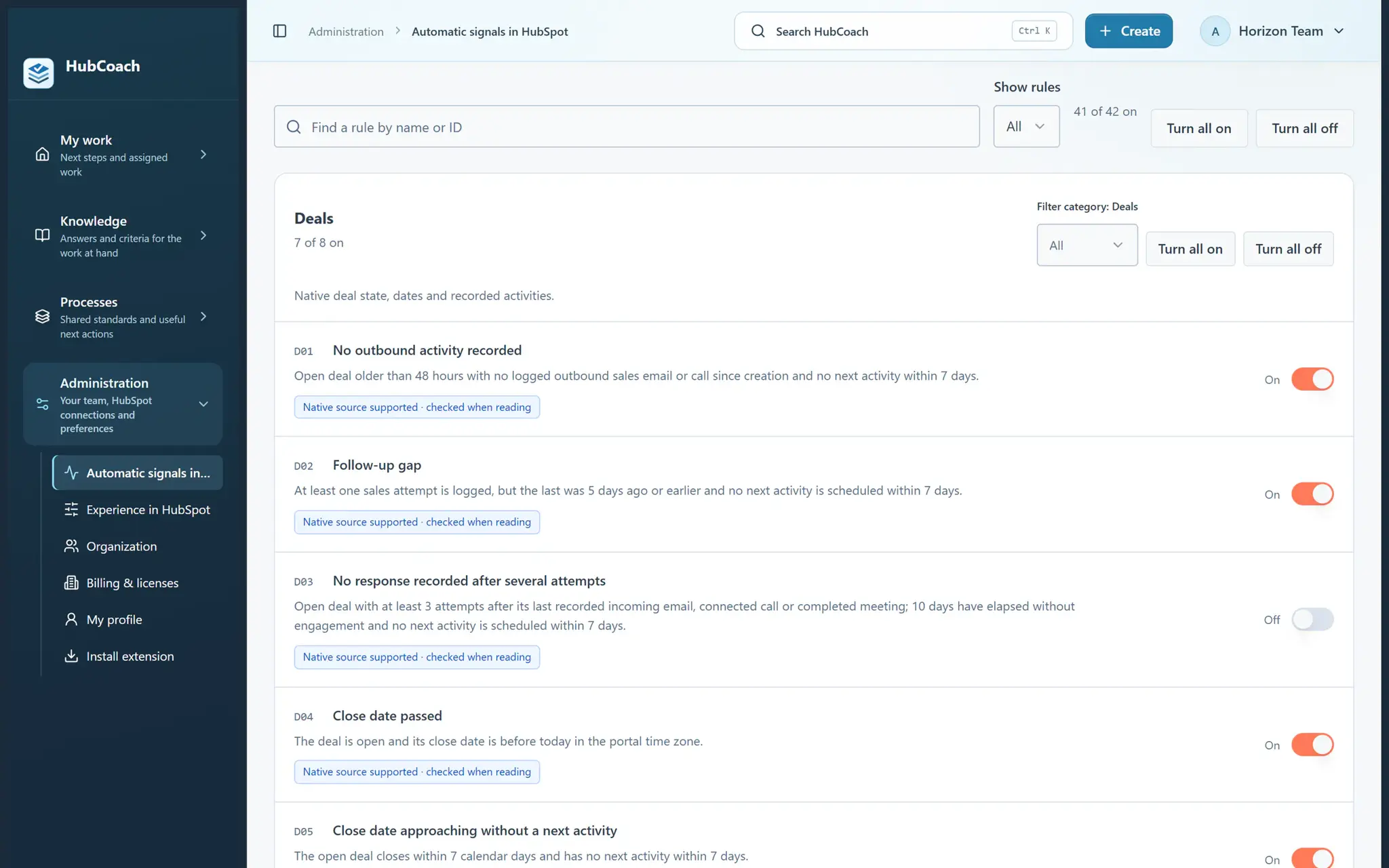
HubCoach comes with 42 checks across seven groups of HubSpot data: deals, contacts, companies, tickets, activities, marketing and aggregates. They start switched on and your organization decides which to keep.

  • An administrator switches off one check, a category or the whole library.
  • Exceptions can be set for each connected portal.
  • What gets checked depends on HubSpot data and permissions.
Manage the automatic signals
Automatic deal checks with their switches: one was switched off by the organization
The organization decides which checks stay on, with sample data.
  • 8

    Deals

    • No outbound activity recorded
    • Follow-up gap
    8 checks
  • 5

    Contacts

    • Sales-qualified contact without an owner
    • Contact email awaiting a recorded reply
    5 checks
  • 5

    Companies

    • Company with open deals and no owner
    • Company with an urgent open ticket
    5 checks
  • 9

    Tickets

    • Reply SLA overdue
    • Reply SLA due soon
    9 checks
  • 8

    Tasks, meetings, calls and timeline

    • Overdue task
    • Upcoming task linked to an active signal
    8 checks
  • 4

    Marketing

    • Spam complaints recorded
    • Elevated hard bounces
    4 checks
  • 3

    Aggregates and analytics

    • Incomplete source coverage
    • Several reviewed deals need attention
    3 checks
  • 42

    On from the start

    Each organization decides which to keep, and in which portal.

Also included

What else does HubCoach include?

Features that help the team find, confirm and repeat what was agreed without leaving HubSpot.

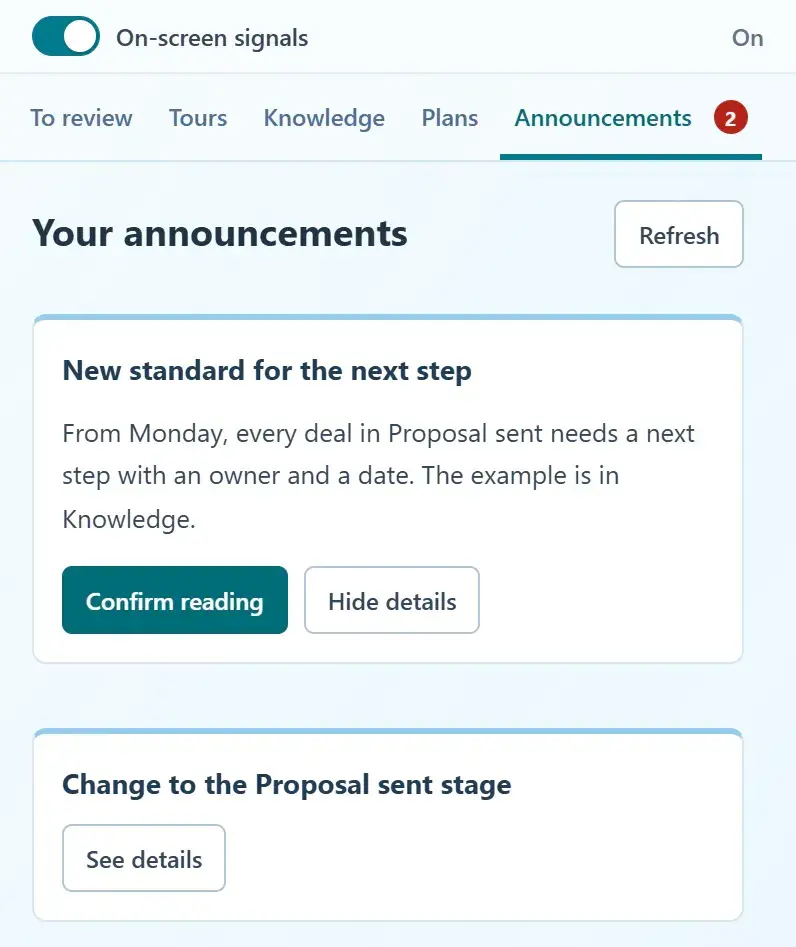
  • Announcements with read confirmation

    Share a process change inside HubSpot. The person opens the details and confirms they read it.

  • Most read this week

    A Top 5 of the most-read content. Reading is not mastering: it helps you improve the material.

  • Side Panel across the portal

    Also on home, reports, settings and automations, not only on records.

  • Real fields in articles

    HubCoach verifies your portal’s labels when the article opens and warns you when a reference needs review.

Share an update and confirm it was read
A team announcement open in the Side Panel with the Confirm reading button and a second pending announcement
Announcements with read confirmation, with sample data.
Who it is for

Who is HubCoach for?

Three roles, one way of working: the criteria are agreed once and found on the record.

  • Two people agree on an idea beside a notebook in an office.
    RevOps and CRM administrators

    Define the criteria once

    Publish rules, processes and articles for each audience and adjust them when the team reports an exception.

    Create your first rule
  • One person supports another while they work on a laptop.
    Sales and service leaders

    Coach with real records

    Assign action plans and review the next step and the handoff with your team, deal by deal.

    See the leaders use case
  • A person wearing a headset takes a call beside a laptop.
    Reps, new hires and agents

    Know what to do on every record

    Find what is missing, why it matters and how it is done in HubSpot, without leaving the deal or the ticket.

    How to work through notices
Use cases

When do teams use HubCoach?

Six moments where work in HubSpot breaks down for teams in Chile and Latin America.

  • Sales follow-up

    Next steps someone else can pick up, and close dates that reflect what was agreed.

    See the use case
  • Sales-to-service handoff

    Service receives the scope, the commitments and the contact without asking again.

    See the use case
  • Onboarding new hires

    Repeated CRM questions are answered next to the record, with assigned practice.

    See the use case
  • Coaching by leaders

    Review a real deal with the person and agree on the next decision, without chasing data.

    See the use case
  • Customer service

    Tickets and SLAs with judgment: what to handle first, why and which article explains the case.

    See the use case
  • Guided tours

    You record a task once and each person follows it on their own HubSpot screen.

    See the use case
Where it comes from

Why did we build HubCoach?

Running HubSpot with B2B teams in Chile and Latin America, we kept seeing the same thing: training ends and the criteria stay in a slide deck. The answer was not another dashboard.

  • Put the criteria where the decision happens.
  • Explain the reason with an example and the exception.
  • Let the person act in HubSpot.
  • Review real records before concluding that something changed.
If you want support: HubSpot implementation
Two people review a laptop beside an office window.
No fine print

What does HubCoach do, and what does it not do?

What HubCoach does for your team and what it leaves out on purpose.

HubCoach does

  • Show the team’s criteria next to the record.
  • Explain the reason with an example and the exception.
  • Open the native HubSpot editor so the person can act.
  • Respect HubSpot and organization permissions.

HubCoach does not

  • Save changes in HubSpot without the person.
  • Rank reps or give them scores.
  • Replace training or HubSpot workflows.
  • Claim to be an official HubSpot extension.
With Teamwork

How does HubCoach work with Teamwork?In validation

With HubCoach and Teamwork licenses, Quick cleanup (Descarte rápido) comes inside HubSpot: each stalled deal is kept with a next step or discarded with a reason. It is published and still in validation in real portals.

How Quick cleanup works (in Spanish)

More Revenue Hub Latam tools

  • HubSpot Audit

    Check your portal’s health before you ask anything of the team.

    See HubSpot Audit
  • Teamwork

    A weekly routine and visibility by exception for the sales leader (in Spanish).

    See Teamwork
  • PortalSync

    Replicate configuration between portals without rebuilding it by hand.

    See PortalSync
  • License simulator

    Size hubs, seats and contacts before you ask for a quote.

    Open the simulator
Pricing

How much does HubCoach cost?

One price per user. No payments are collected today: we review your application first.

HubCoach

USD 10per user per month

Planned launch price. 7-day trial when your organization receives access.

  • Chrome extension with a Side Panel across the HubSpot portal.
  • 42 checks, with controls by organization and portal.
  • Personal and team rules for different audiences.
  • Knowledge, processes, action plans and guided tours.
  • Announcements with read confirmation and the most-read content.

No payment is collected during this early access stage. Before billing begins we will ask you to confirm a paid subscription.

A Revenue Hub Latam product

Who is behind HubCoach?

HubCoach is a Revenue Hub Latam product. It grew out of what we solve when we implement and run HubSpot with sales and service teams in Chile and Latin America.

  • Criteria that fade after the training ends.
  • Next steps nobody else can pick up.
  • Handoffs that make the customer repeat their story.
HubSpot Solutions Partner Platinum
HubSpot Platinum Partner in Santiago, ChileWe implement, rescue and run HubSpot for B2B companies.
HubSpot Partner Summit LATAM 2026From the Revenue Hub Latam team that created PortalSync: most-voted pitch, Pitch Contest · HubSpot Partner Summit LATAM 2026, Bogotá.
Frequently asked questions

What do teams ask before using HubCoach?

What does HubCoach add to HubSpot?

A web app to create rules, processes, articles and action plans, and a Chrome extension that shows them inside HubSpot, next to the record. Administrators decide who sees what, in which portal and on which records.

Does HubCoach write or change data in HubSpot?

Not on its own. HubCoach shows the criteria and can open the native HubSpot editor; the person reviews and saves the change. It does not replace workflows or block a stage change.

What HubSpot data does HubCoach read?

It reads the fields and records each check or rule needs, with the permissions your organization grants when it connects HubSpot. The details are in the HubCoach privacy policy.

How is the extension installed?

The Chrome extension is installed once your organization receives access: the person signs in with their HubCoach account and opens HubSpot. The steps are in Install and connect the extension.

Does completing a guide prove the team uses HubSpot well?

No. Reads and completed steps describe activity in HubCoach. To know whether the work changed, review real HubSpot records over time, including their quality and exceptions.

How much does HubCoach cost?

USD 10 per user per month, the planned launch price, with a 7-day trial when your organization receives access. No payment is collected during this early access stage.

Is HubCoach an official HubSpot extension?

No. HubCoach is a Chrome extension and web app from Revenue Hub Latam, a HubSpot Platinum Partner in Santiago, Chile. It works on top of HubSpot with the permissions your organization grants.

Does it work for teams outside Chile?

Yes. We built it in Santiago for sales and service teams in Chile and Latin America, and the app, the extension and the help are in Spanish and English. It works with HubSpot in Classic and in the new record experience.

Waitlist

How do I apply to the waitlist?

Current seats are full. Tell us about your team, in Chile or elsewhere in Latin America, and what you would like it to do better in HubSpot.

  1. You apply with your work email and how many people would use it.
  2. We review the list every 15 days and write to you when there is a seat.
  3. You start with a small group and one concrete process.
HubCoach: guidance in HubSpot records | Revenue Hub Latam