
Use case · Leaders

With HubCoach, leaders coach their team on every HubSpot deal in Chile and Latin America

With HubCoach, a Revenue Hub Latam product, a leader assigns an action plan to prepare a deal and reviews it with the person on the real HubSpot record. The pending next step shows up in the rep’s Side Panel, the process board shows which deals need a decision and the conversation starts from facts. There are no rankings or scores: there are agreements with dates.

  • For sales leaders
  • For service leaders
  • No rankings or scores
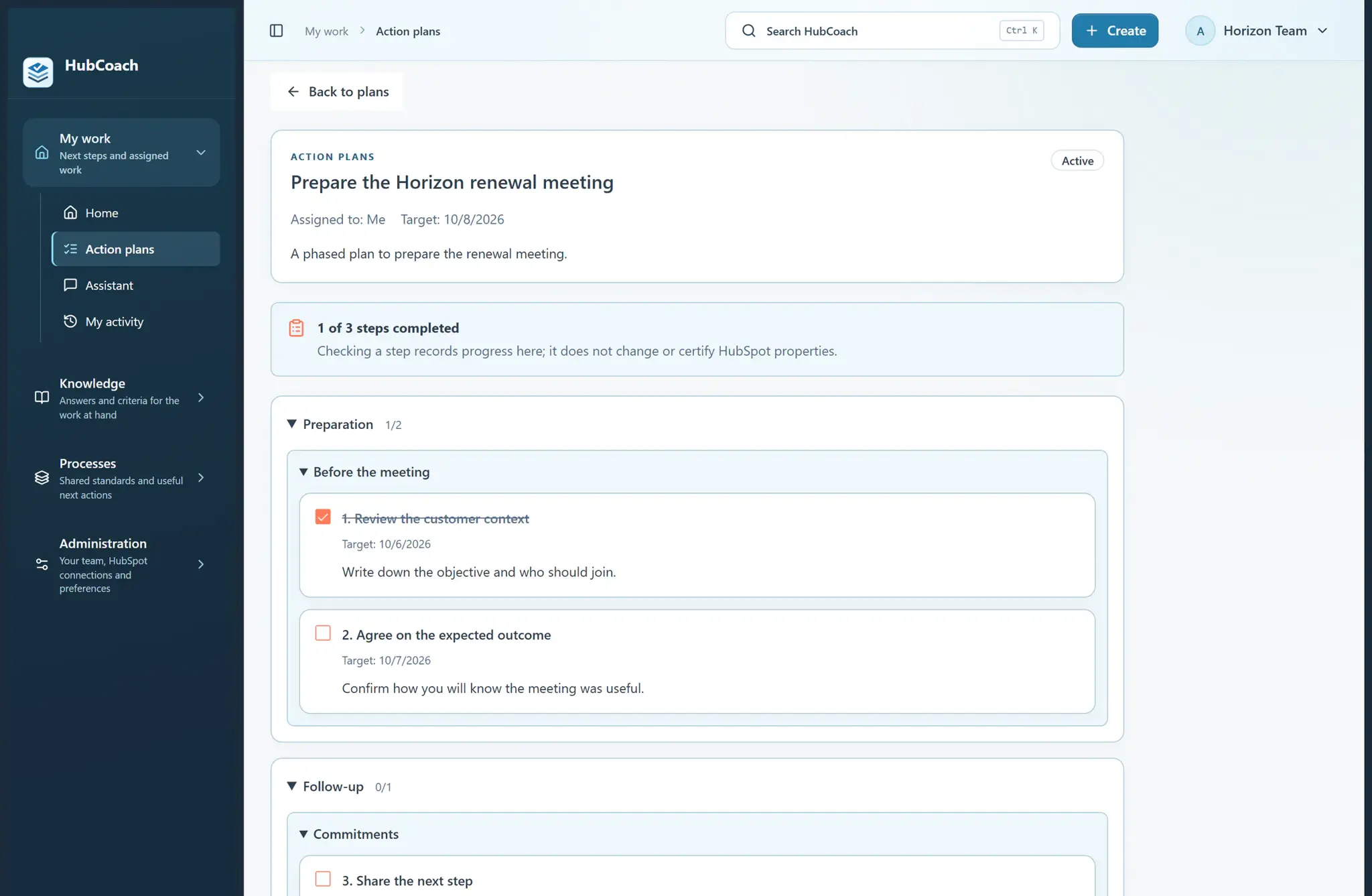
A phased action plan in the HubCoach web app: one of three steps done, with target dates and a note that checking a step does not change HubSpot
Coaching by leadersAt a glance
Problem
The meeting goes into asking for updates
Standard
One deal, one decision and a dated next step
How to measure
Whether someone else could continue the deal
Limit
A checked step records progress, not quality
A phased action plan, with sample data.
The problem

What problem does it solve?

The pipeline meeting turns into a round of questions to catch up. We see it with sales leaders across Chile and Latin America whose teams do want to get it right.

  • The rep fills in fields, but nobody can explain what the customer agreed to.

  • The decision that needs support gets lost among twenty deals reviewed in a rush.

  • Any mistake leads to “more training”, without checking what makes the work hard.

The standard

What standard does the team agree on?

Start with one deal and one decision. Separate what is confirmed from assumptions. Agree on the next action, who does it and when to revisit. Check what makes the work hard before prescribing more training.

  • Good

    Confirmed: the committee meets on Monday. Assumed: the budget is approved. Next step: ask about it on Thursday.

  • Good

    The review ends with a decision: keep the deal with a date or close it with a reason.

  • Could be better

    “How is that deal going?” asked twenty times in the same meeting.

  • Could be better

    Reviewing only empty fields and concluding that the problem is discipline.

In HubSpot

What does it look like inside HubSpot?

The plan reaches the rep’s record and the board organizes the review.

Side Panel

The plan’s next step, on the deal

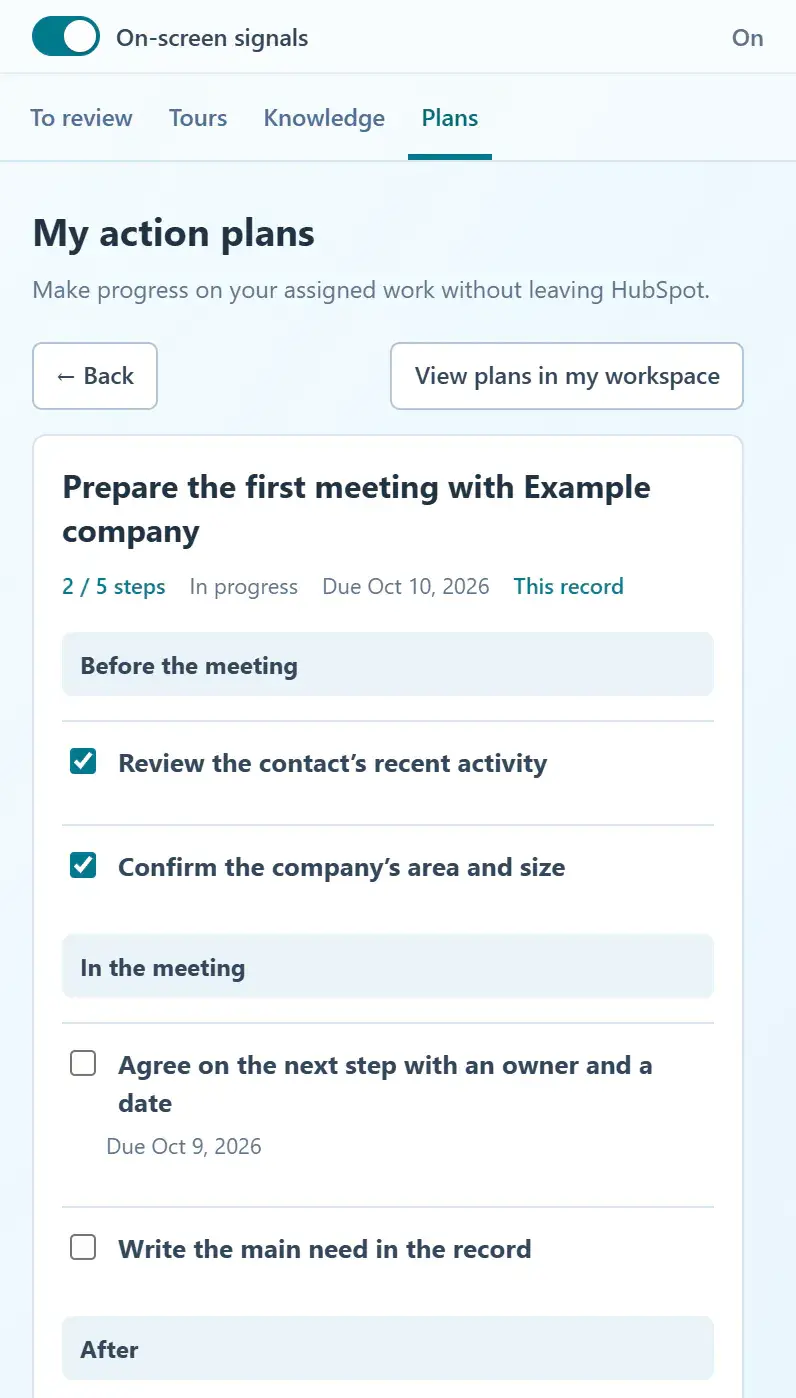
The rep sees the pending step under To review, with the phases before, during and after the meeting.

  • Checking a step does not change HubSpot.
  • The next-step card brings the criterion, an example and the exception.
Continue a plan from the record
An assigned action plan in the Side Panel: two steps done, the pending next step with its due date and the before, during and after phases of the meeting
A plan assigned to a record, with sample data.
Process board

Which deals need a decision

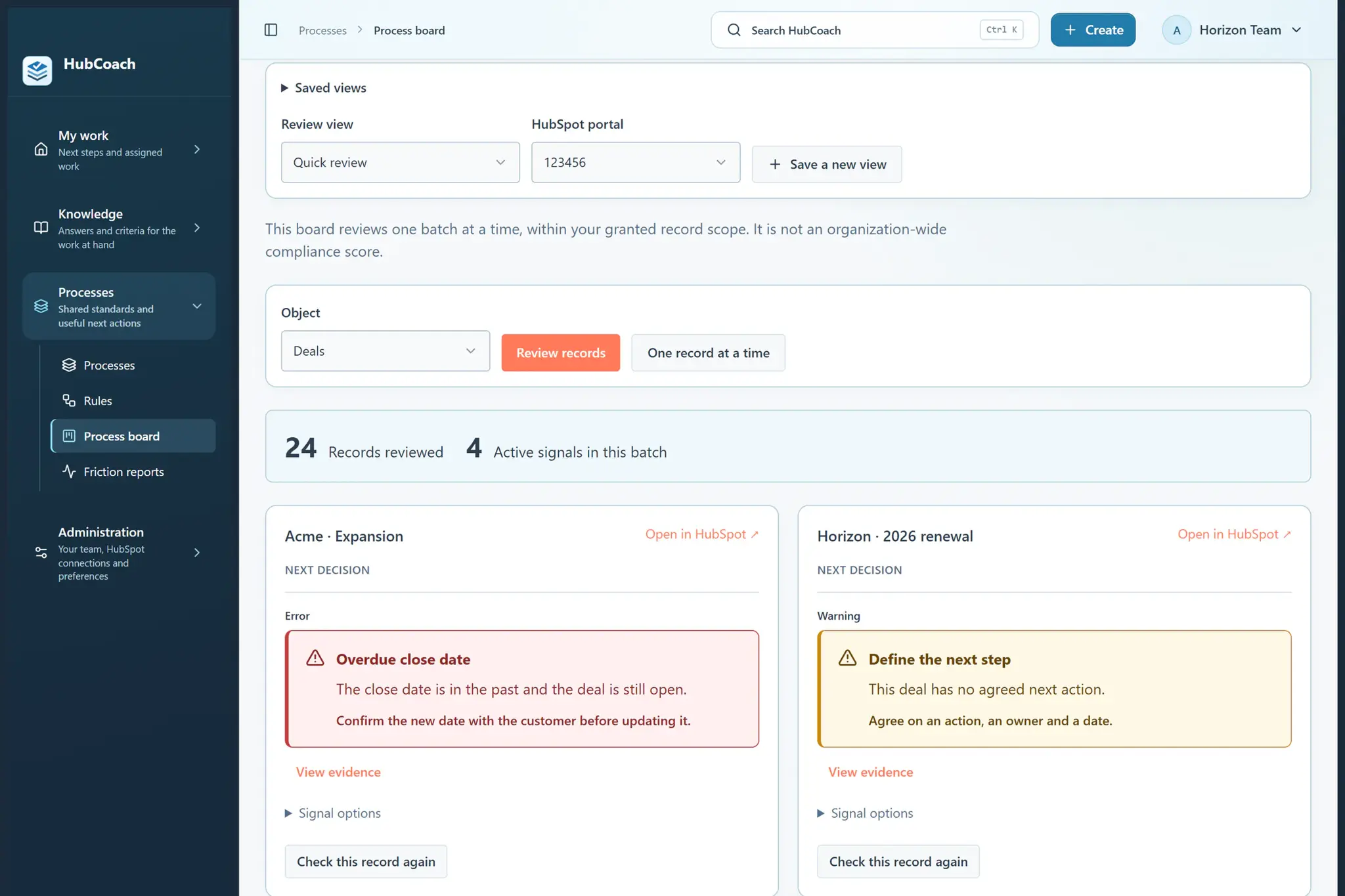
A saved view shows the records reviewed, active signals and the next decision for each deal.

  • The same view for every weekly meeting.
  • The board shows the batch you queried, not the whole portal.
Save a board for your daily review
Process board with a review view: records reviewed, active signals and the next decision for each deal
A sales team's process board, with sample data.
Getting started

How do you put it in place?

One deal a week is enough to start.

  1. 01

    Adapt the “Review a deal without chasing updates” template

    To your team’s criteria: what is confirmed, what is assumed and what is decided.

  2. 02

    Assign a copy to the person preparing the deal

    With a date and the HubSpot record linked. Their pending step appears under To review.

  3. 03

    Review the real record together

    Use the next-step card for the criterion, an example and the exception.
  4. 04

    Adjust the guide when it does not fit

    If the instruction does not match the case, fix the guide, not the person.

Measuring

How do you know it is working?

Two questions at the end of every review.

  • Could someone else continue the deal from the recorded next step?
  • Did the review produce a decision, with an owner and a date?
  • Which exceptions are still open, and who resolves them?
These are questions for a team review, not a coaching score. HubCoach does not grade people or compare them with each other.
Limits

What does HubCoach not solve?

HubCoach prepares the conversation; people have the conversation.

  • A checked step records progress, not a quality judgment.
  • HubCoach does not listen to meetings or change fields for the rep.
  • It does not rank reps or produce performance scores.
Roles

Who takes part?

Coaching is not supervising: the leader and the person review the same record together.

  • The leader assigns the plan and prepares the question.
  • The rep prepares the deal and proposes the next step.
  • RevOps maintains the template and the saved board.
One person supports another while they work on a laptop.
Keep reading

Which guides and articles help with this use case?

The sales coaching guide explains how to review deals with your team; the overdue date guide, what to do with each case.

Guides for this use case
  • Practical guide

    Sales coaching in HubSpot

    Review a real decision with the person, without chasing updates.

    5 min readRead the guide
  • Practical guide

    Overdue close date in HubSpot

    How to find them, what to confirm before moving them and when to close as lost.

    5 min readRead the guide
Help articles
A Revenue Hub Latam product

Who is behind HubCoach?

HubCoach is a Revenue Hub Latam product. It grew out of what we solve when we implement and run HubSpot with sales and service teams in Chile and Latin America.

  • Criteria that fade after the training ends.
  • Next steps nobody else can pick up.
  • Handoffs that make the customer repeat their story.
HubSpot Solutions Partner Platinum
HubSpot Platinum Partner in Santiago, ChileWe implement, rescue and run HubSpot for B2B companies.
HubSpot Partner Summit LATAM 2026From the Revenue Hub Latam team that created PortalSync: most-voted pitch, Pitch Contest · HubSpot Partner Summit LATAM 2026, Bogotá.
Frequently asked questions

What do teams ask before using HubCoach?

Does HubCoach score or rank salespeople?

No. There are no rankings or coaching scores. Plans and signals show work that needs attention; the leader and the rep review its quality together.

Can a leader see the team’s plans?

Yes. Administrators can filter and review the team plans they can access and edit their instructions. Saving a plan never updates HubSpot records.

How long does a review take with this method?

It depends on the deal. The template is meant to review one deal in depth instead of twenty in a rush; many leaders start with a weekly review.

Does it work for customer service leaders?

Yes. The same plan works with a ticket: what was confirmed with the customer, what is missing and the next action before the SLA expires.

Does checking a plan step update HubSpot?

No. Checking a step saves the plan’s progress, but it does not change the record or prove the meeting or the change happened. That is reviewed in HubSpot.

How does it combine with Teamwork?

Teamwork gives the leader a weekly routine and visibility by exception; HubCoach brings the criteria to the record. The bridge between them, Quick cleanup inside HubSpot, is in validation.

Does it work if the leader and the team are in different cities?

Yes. The review happens on the HubSpot record and the plan reaches each person’s Side Panel, so it works the same with a leader in Santiago, Chile, and reps in other Latin American countries.

Waitlist

How do I apply to the waitlist?

Current seats are full. Tell us about your team, in Chile or elsewhere in Latin America, and what you would like it to do better in HubSpot.

  1. You apply with your work email and how many people would use it.
  2. We review the list every 15 days and write to you when there is a seat.
  3. You start with a small group and one concrete process.
Leaders who coach with HubCoach | Revenue Hub Latam