Use case · Sales and service

With HubCoach, service receives the deal’s context inside HubSpot in Chile and Latin America

With HubCoach, a Revenue Hub Latam product, sales and service agree on what gets handed over when a deal closes, and that agreement appears in HubSpot next to the record. A guide shows the minimum context with a complete example, a process checks the fields behind it and a plan assigns the confirmation to the receiving team. The customer does not have to repeat their story.

  • For sales and service leaders
  • For reps and agents
  • For RevOps
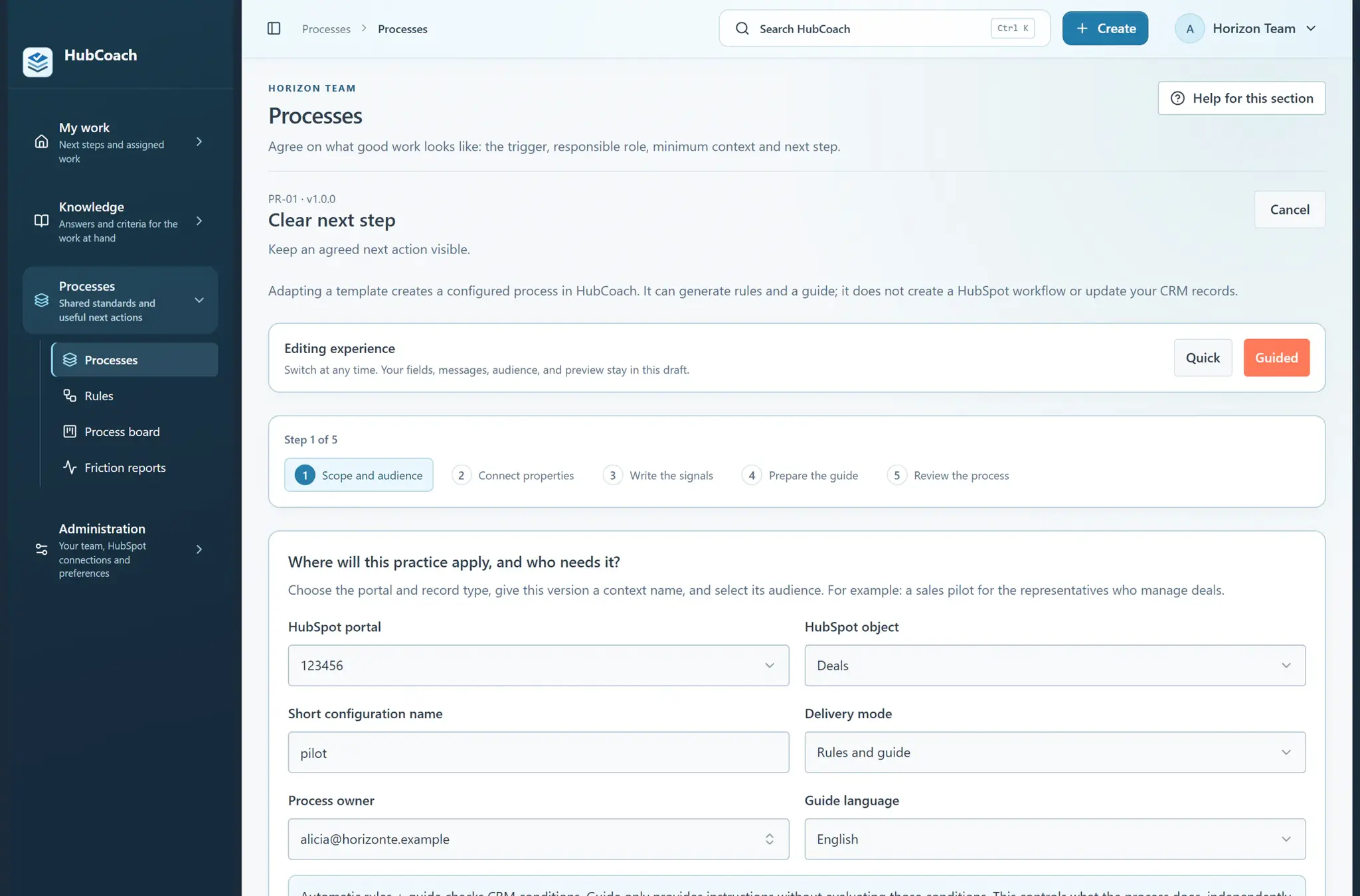
The Clear next step process template in guided mode: five steps, from scope and audience to reviewing the process, without creating HubSpot workflows
Handoff to serviceAt a glance
Problem
Service rebuilds the scope from notes and emails
Standard
Scope, commitments, contact and first action
How to measure
Whether the receiving team could start without asking again
Limit
It does not copy notes to the ticket or replace an integration
A process template ready to adapt, with sample data.
The problem

What problem does it solve?

The deal is closed, but the next team has to rebuild what was promised. It happens in B2B companies across Chile and Latin America that split sales, implementation and support.

  • The agreed scope is spread across notes, emails and a conversation with the seller.

  • The customer repeats what they already said and onboarding starts with open questions.

  • Nobody knows who confirms that the handoff was accepted, or when.

The standard

What standard does the team agree on?

Agree on what triggers the handoff, who hands over and who receives, the minimum context and what acceptance means. Include scope, commitments, contact and the first action expected from service.

  • Good

    Scope: implementation of 3 pipelines. Commitment: training on the 10th. Contact: head of operations. First action: kickoff meeting this week.

  • Good

    Service confirms receipt in the plan and notes what was missing, to improve the guide.

  • Could be better

    “Customer closed, see emails”. Service has to find the scope on its own.

  • Could be better

    The handoff counts as accepted because someone checked a step, without talking to the customer.

In HubSpot

What does it look like inside HubSpot?

The handoff guide sits next to the record and the plan assigns who confirms.

Knowledge

The handoff guide next to the record

The article shows the real HubSpot fields behind the handoff, with their exact labels.

  • The receiving team reads it without leaving the record.
  • HubCoach warns you if a portal label changed.
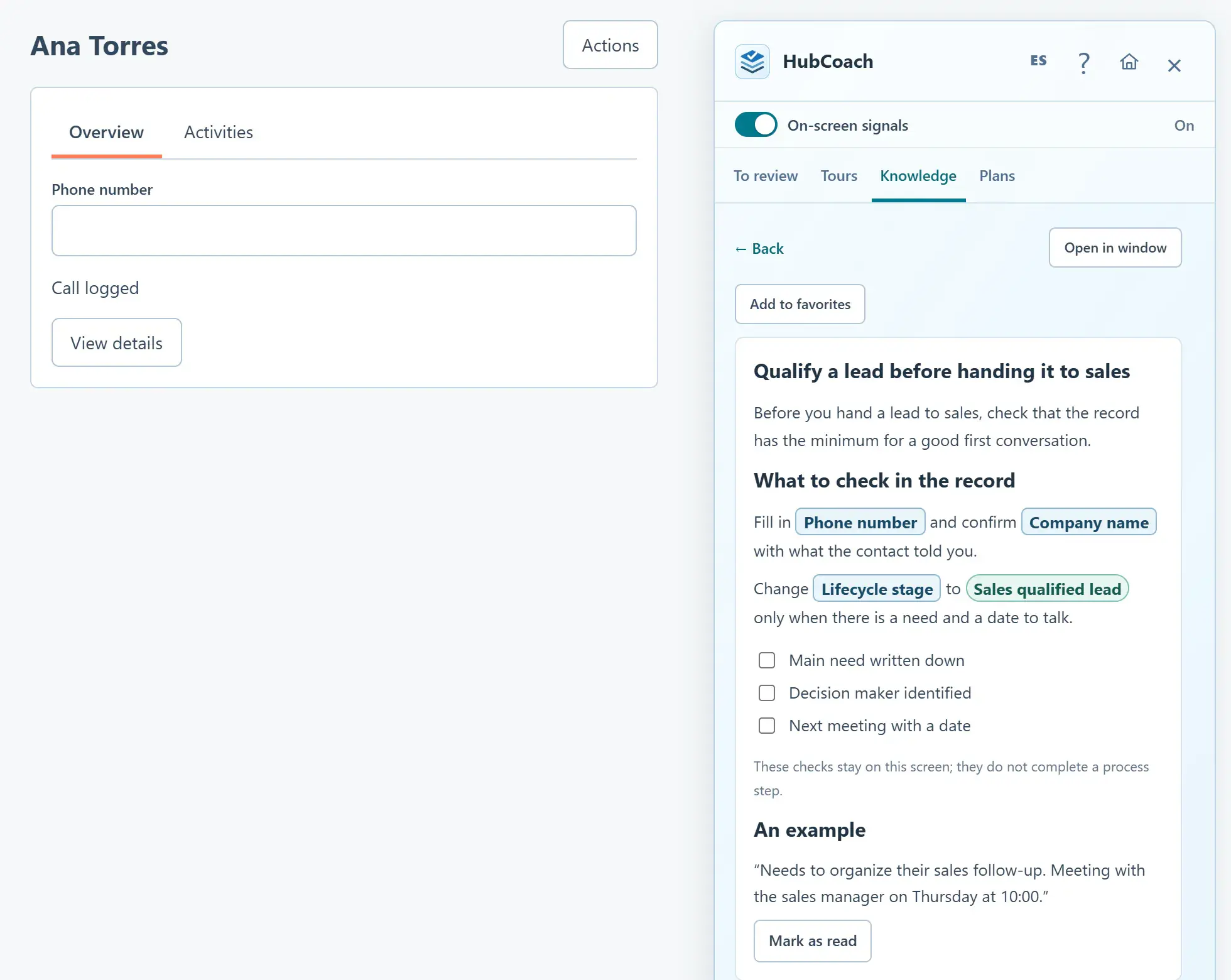
Use real HubSpot fields in an article
A Knowledge article open in the Side Panel next to a contact: real HubSpot fields such as Phone number and Lifecycle stage appear in boxes
An article with real HubSpot fields next to the record, with sample data.
Action plans

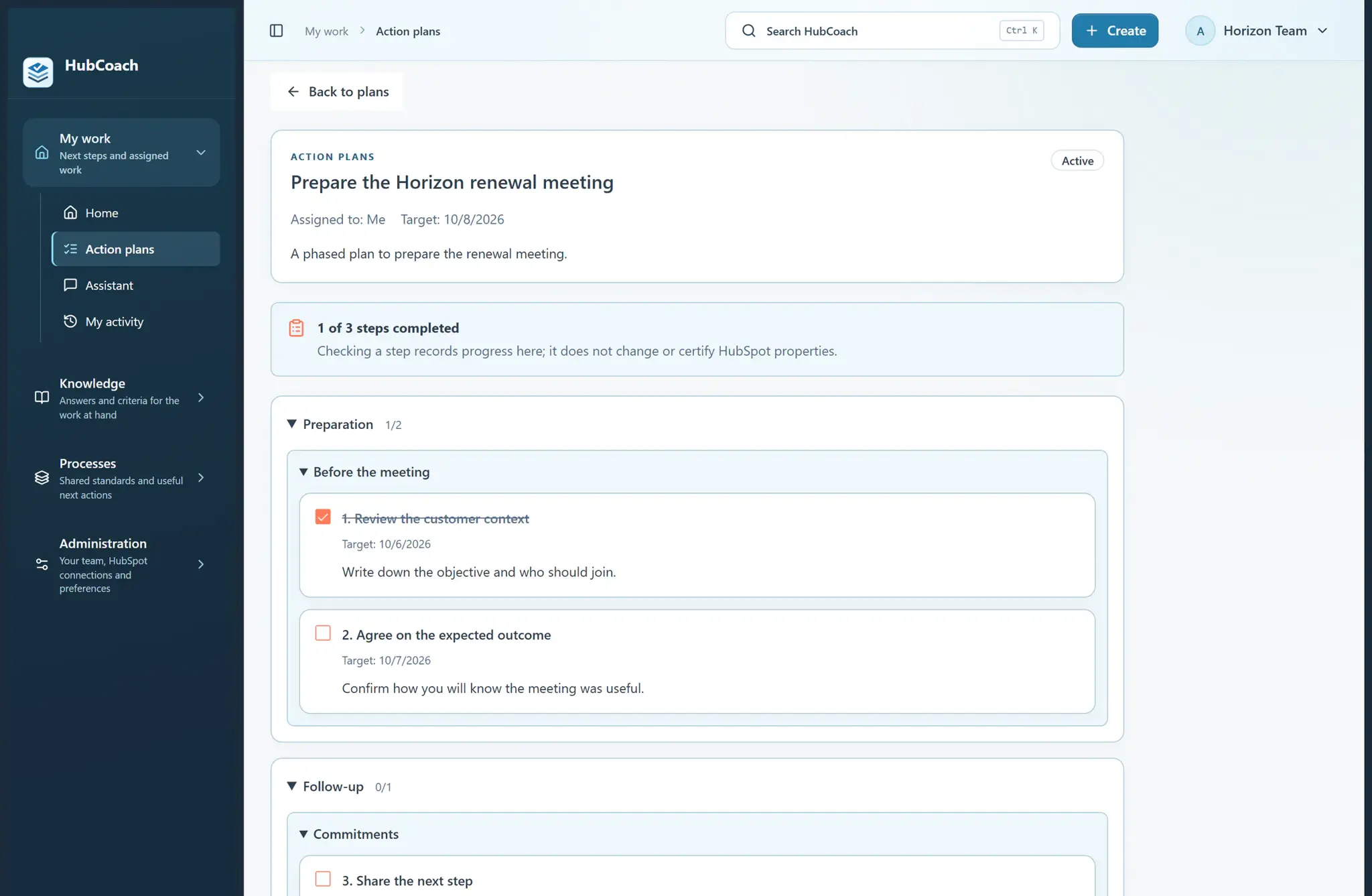
A plan with a step to confirm receipt

The plan assigns the handoff steps to the owner, with dates, and ends with the receiving team’s confirmation.

  • Checking a step does not change HubSpot.
  • Leaders see which handoffs are still pending.
Assign and complete an action plan
A phased action plan in the HubCoach web app: one of three steps done, with target dates and a note that checking a step does not change HubSpot
A phased action plan, with sample data.
Getting started

How do you put it in place?

Start with one type of deal and one receiving team.

  1. 01

    Document the standard in a shared guide

    With a complete example of a good handoff and one that could be better.

  2. 02

    Check the fields with a process

    A process checks the record properties that support the standard.

  3. 03

    Assign a handoff plan

    To the owner, with a final step to confirm receipt with the next team.

  4. 04

    Adjust the guide with what was missing

    After each handoff, service notes which information it had to ask for again.

Measuring

How do you know it is working?

Review the pilot handoffs with both teams.

  • Could the receiving team start without asking again for the same information?
  • What context was missing, and who should have provided it?
  • Which exceptions repeat, such as projects with an open scope?
Completing the plan records progress; it does not prove the handoff was accepted. The receiving person gives that confirmation.
Limits

What does HubCoach not solve?

HubCoach organizes the handoff; the information has to exist in HubSpot.

  • A guide or a plan does not copy deal notes into the ticket.
  • It does not create integrations or associations between objects.
  • If HubSpot is missing associations, fix them before expecting a reminder to.
Roles

Who takes part?

A handoff has two sides, and each knows its part.

  • The rep hands over scope, commitments and contact.
  • Service confirms receipt and notes what was missing.
  • RevOps maintains the guide, the process and the plan template.
Three people work in a meeting room with a blurred display.
Keep reading

Which guides and articles help with this use case?

The handoff guide explains what to have ready before the handoff; the articles show how to set it up in HubCoach.

Guides for this use caseHelp articles
A Revenue Hub Latam product

Who is behind HubCoach?

HubCoach is a Revenue Hub Latam product. It grew out of what we solve when we implement and run HubSpot with sales and service teams in Chile and Latin America.

  • Criteria that fade after the training ends.
  • Next steps nobody else can pick up.
  • Handoffs that make the customer repeat their story.
HubSpot Solutions Partner Platinum
HubSpot Platinum Partner in Santiago, ChileWe implement, rescue and run HubSpot for B2B companies.
HubSpot Partner Summit LATAM 2026From the Revenue Hub Latam team that created PortalSync: most-voted pitch, Pitch Contest · HubSpot Partner Summit LATAM 2026, Bogotá.
Frequently asked questions

What do teams ask before using HubCoach?

Does HubCoach copy deal information into the ticket?

No. It provides guidance, supported checks and action plans. The associations or information transfer your process needs are configured in HubSpot.

Who confirms that the handoff was accepted?

The person who receives the case. A plan step can record that confirmation, but your teams define what acceptance means and how it is shown.

Does it work if sales and service use different HubSpot objects?

Yes. A rule can check related records, such as the ticket or the company associated with the deal, without copying fields between objects.

What minimum context should we require?

The scope sold, commitments with dates, the contact who decides and the first action expected from service. If your team needs more, add it to the guide with an example.

Do I need an integration for this use case?

Not for the standard and the guide. If the handoff depends on data moving between systems, that integration is solved separately; Revenue Hub Latam implements it for teams in Chile and Latin America.

How does it relate to the service-to-sales handoff?

It is the opposite direction. When a ticket reveals an opportunity, the guide from customer service to sales explains how to send it back to sales.

Does it work if implementation and support are in another country?

Yes. The handoff agreement and the guide sit next to the HubSpot record, so they reach a team in Chile and one in another Latin American country the same way. Write them in the language of whoever receives.

Waitlist

How do I apply to the waitlist?

Current seats are full. Tell us about your team, in Chile or elsewhere in Latin America, and what you would like it to do better in HubSpot.

  1. You apply with your work email and how many people would use it.
  2. We review the list every 15 days and write to you when there is a seat.
  3. You start with a small group and one concrete process.
Context for service with HubCoach | Revenue Hub Latam