Use case · Onboarding

With HubCoach, new hires learn HubSpot on every record in Chile and Latin America

With HubCoach, a Revenue Hub Latam product, what a new hire learned in training is still there when they have to decide. The Side Panel shows the criterion, an example and the exception next to the record; a guided tour points at where to click in your portal; and a plan assigns practice steps for the first weeks. Nobody has to interrupt the administrator with the same question.

  • For new hires
  • For RevOps and administrators
  • For leaders
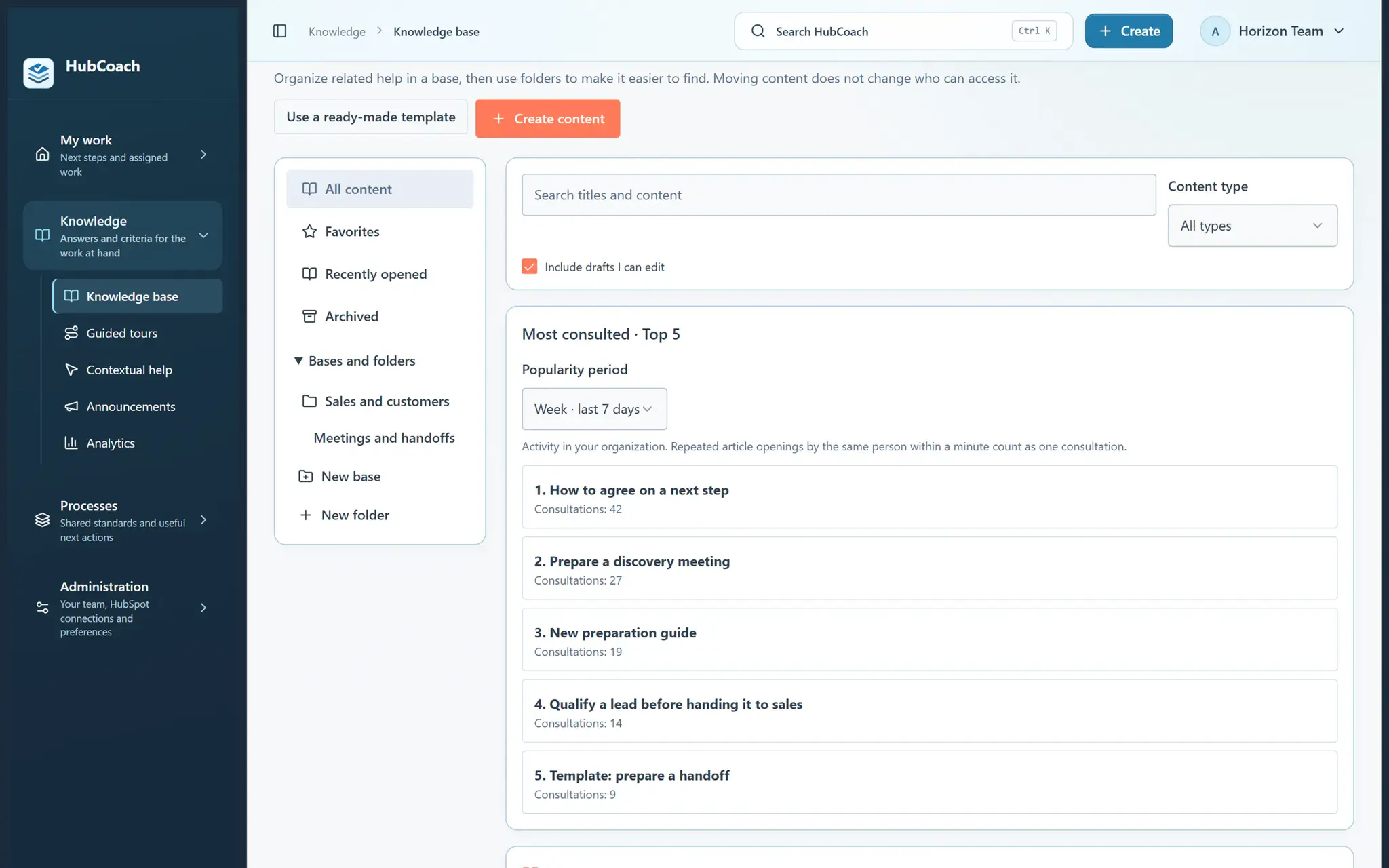
HubCoach knowledge base with folders, favorites and the Most consulted block for the last 7 days
New hiresAt a glance
Problem
Training fades when the real decision comes
Standard
One decision per role, with an example and an exception
How to measure
The same task on a real case, after practice
Limit
Reading or checking steps does not certify a skill
The team's knowledge base, with sample data.
The problem

What problem does it solve?

The person remembers the training but cannot decide which option fits this customer. We see it with every new hire in sales and service teams across Chile and Latin America.

  • They interrupt the CRM administrator with a question already answered ten times.

  • They look for an old document that no longer matches the portal’s fields.

  • They copy what someone else did, mistake included.

The standard

What standard does the team agree on?

Choose one real decision for one role. Explain when it applies, the expected action, a good example and a common exception. Leave room to practice and review a real case together.

  • Good

    Qualifying a lead before passing it to sales: what to check, an example and what to do if the phone is missing.

  • Good

    A five-step tour to create a deal from a contact, followed on the person’s own record.

  • Could be better

    A 40-page manual in a shared folder that nobody opens while working.

  • Could be better

    One training session on day one, then “ask if you have questions”.

In HubSpot

What does it look like inside HubSpot?

The tour shows where the task is done and the Side Panel explains which option fits.

Guided tour

A tour shows where it is done in your portal

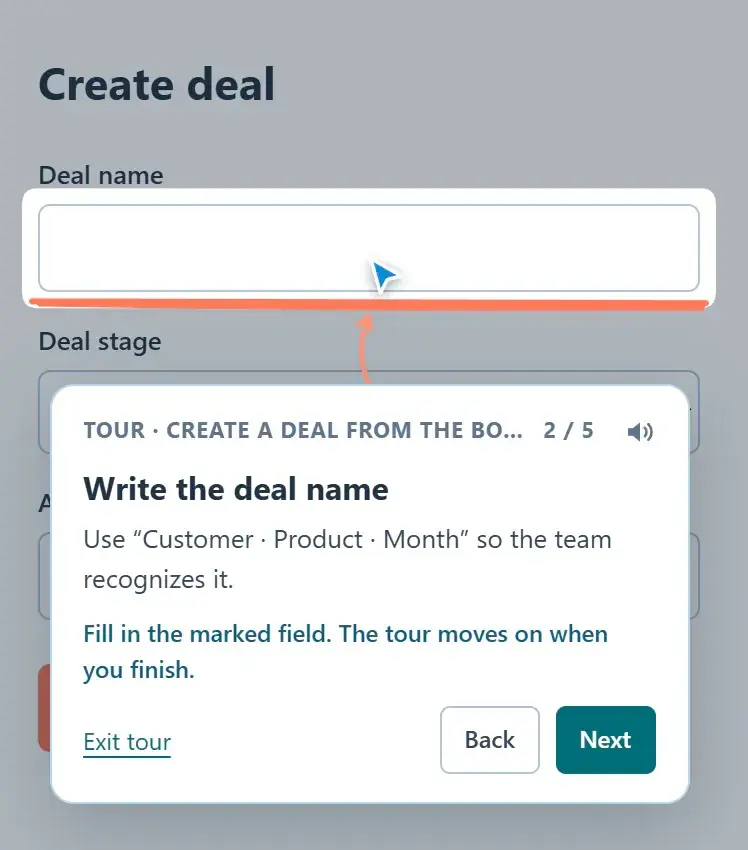
The new hire follows the tour on their own screen: a balloon points at each control and they do the real action on the record.

  • The tour never clicks or saves for anyone.
  • You record it once and it serves every new hire.
Follow a guided tour inside HubSpot
Guided tour at step 2 of 5: the balloon asks for the deal name and highlights the field in the create form
A step-by-step guided tour, with sample data.
Side Panel

The article right next to the record

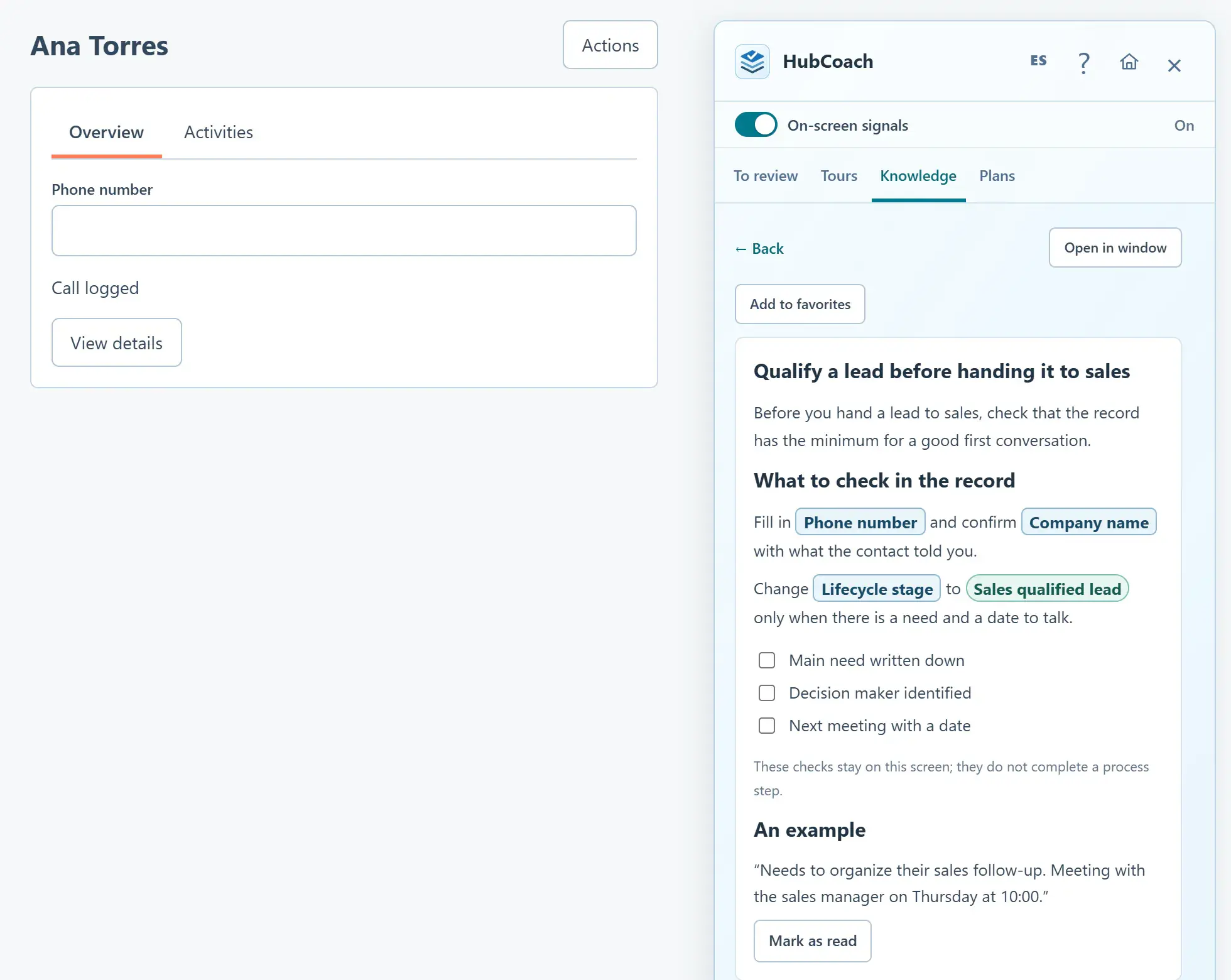
The person reads the criterion, with real HubSpot fields in boxes, while filling in the contact.

  • Suggestions based on the open record.
  • No switching tabs or searching another tool.
Put an answer beside the field where it is needed
A Knowledge article open in the Side Panel next to a contact: real HubSpot fields such as Phone number and Lifecycle stage appear in boxes
An article with real HubSpot fields next to the record, with sample data.
Getting started

How do you put it in place?

Start with the question your team asks most often.

  1. 01

    Write a short card or guide

    About the decision the team keeps asking about, with an example and an exception.

  2. 02

    Publish it in the Side Panel

    And set up contextual help beside the field where it is supported.

  3. 03

    Record a tour for the task in your portal

    So the person sees where to click and does the real action themselves.

  4. 04

    Assign a plan with practice and review

    And use friction reports to improve unclear instructions.

Measuring

How do you know it is working?

Watch the same task on a real case after practice, and review it again later.

  • Did the person choose the right option without asking?
  • What difficulties are still open, and why?
  • Which instructions did they report as unclear?
This is a team review routine, separate from reading analytics. Opening an article is not the same as mastering the task.
Limits

What does HubCoach not solve?

HubCoach brings the criteria closer; it does not replace practice or fix the process.

  • Opening content and checking steps does not certify a skill.
  • If the person cannot act because of permissions or double entry, fix that cause first.
  • A process that changes every week needs to be agreed before it is written down.
Roles

Who takes part?

Onboarding works when each role does its part.

  • RevOps writes the guide and records the tour.
  • The new hire practices on real records and reports what is unclear.
  • The leader reviews a real case with them every week.
A group reviews a process during a working session.
Keep reading

Which guides and articles help with this use case?

The enablement guide explains how to train inside the record; the articles show how to do it with HubCoach.

Guides for this use caseHelp articles
A Revenue Hub Latam product

Who is behind HubCoach?

HubCoach is a Revenue Hub Latam product. It grew out of what we solve when we implement and run HubSpot with sales and service teams in Chile and Latin America.

  • Criteria that fade after the training ends.
  • Next steps nobody else can pick up.
  • Handoffs that make the customer repeat their story.
HubSpot Solutions Partner Platinum
HubSpot Platinum Partner in Santiago, ChileWe implement, rescue and run HubSpot for B2B companies.
HubSpot Partner Summit LATAM 2026From the Revenue Hub Latam team that created PortalSync: most-voted pitch, Pitch Contest · HubSpot Partner Summit LATAM 2026, Bogotá.
Frequently asked questions

What do teams ask before using HubCoach?

Does HubCoach replace HubSpot training?

No. It keeps the agreed criteria, examples and practice steps available after the training, in the Side Panel next to the record.

Can I combine guides with guided tours?

Yes. Use a guide for the criterion and the exception, and a guided tour to show where to click in your portal. The person always does the real action.

How much content should we prepare before the first hire?

Little and useful. Start with the five or six decisions a new hire makes in their first weeks and add more when the team asks.

Does the new hire need a HubCoach account?

Yes. Each person uses their own account and the Chrome extension. The administrator decides what content they see based on their role.

Does it work for service agents as well as sales?

Yes. The same approach works for tickets: an article on how to classify or escalate a case, suggested while the person works the ticket.

Is it available in Spanish for Latin American teams?

Yes. The app and the extension are in Spanish and English, and tours can be written in both languages. Your team writes its articles in the language it works in.

Does it work if the new hire is in another city or country?

Yes. The help, the tours and the plan reach each person’s HubSpot record, so onboarding works the same in Santiago, Chile, as in any other city in Latin America, without an in-person session.

Waitlist

How do I apply to the waitlist?

Current seats are full. Tell us about your team, in Chile or elsewhere in Latin America, and what you would like it to do better in HubSpot.

  1. You apply with your work email and how many people would use it.
  2. We review the list every 15 days and write to you when there is a seat.
  3. You start with a small group and one concrete process.
New hires in HubSpot with HubCoach | Revenue Hub Latam