Use case · Sales

Sales follow-up with HubCoach: your team’s criteria inside HubSpot in Chile and Latin America

With HubCoach, a Revenue Hub Latam product, the follow-up criteria your team agreed on show up on every HubSpot deal: a next step someone else can pick up and a realistic close date. The Side Panel shows what is missing, with an example and the field one click away. The person updates the deal in HubSpot and the leader reviews a sample with the team.

  • For sales leaders
  • For sales reps
  • For RevOps
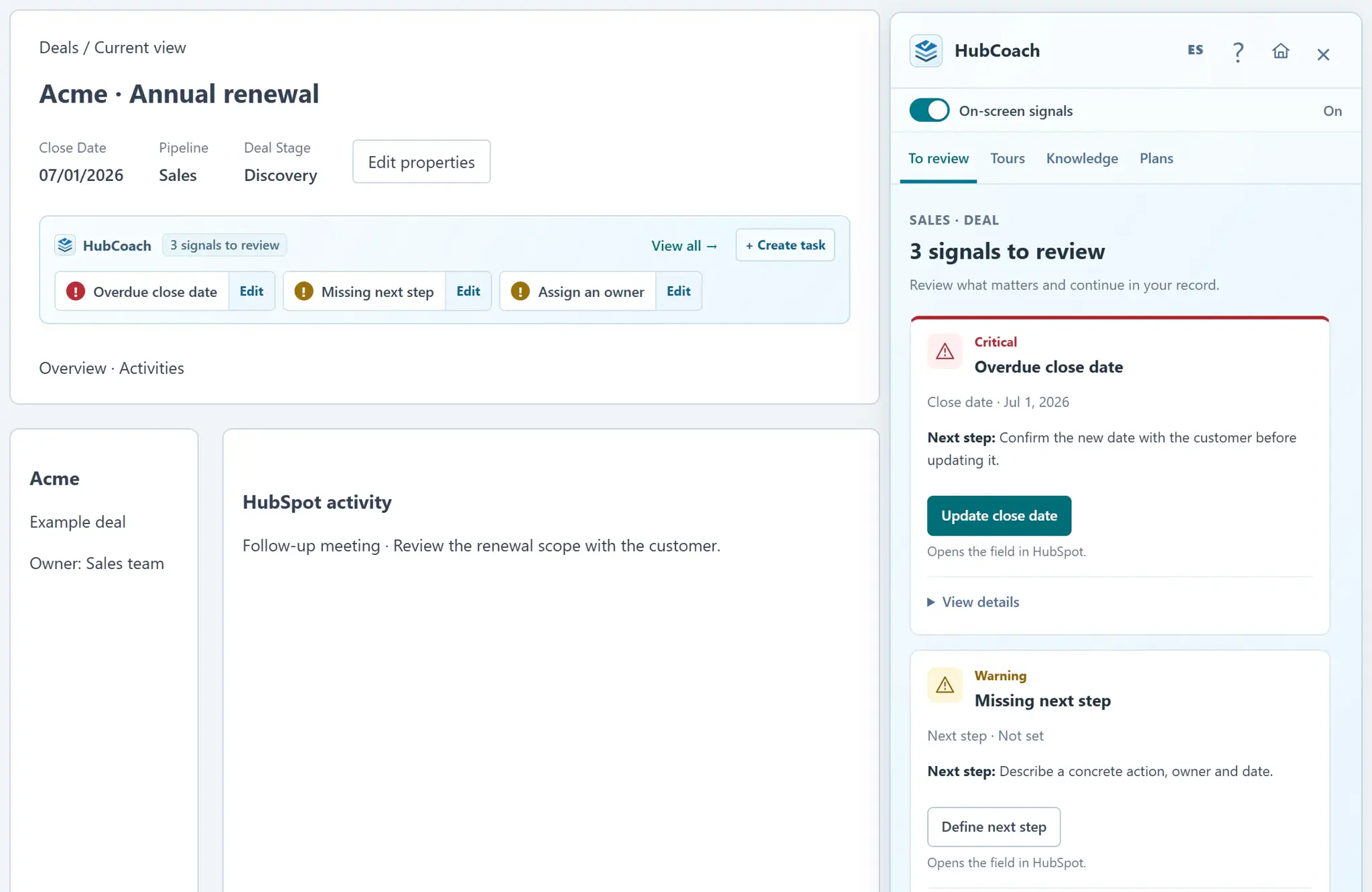
A HubSpot deal record with the HubCoach signal strip showing three signals to review, and the Side Panel open on the overdue close date and the missing next step
Sales follow-upAt a glance
Problem
Generic next steps and close dates that never move
Standard
Action, owner and a date agreed with the customer
How to measure
A sample of deals before and after the pilot
Limit
An empty-value rule does not judge the step’s quality
HubCoach signals on a deal record, with sample data.
The problem

What problem does it solve?

The pipeline review turns into a round of questions about what happened to each deal. We see it in teams across Chile and Latin America with a well-implemented HubSpot.

  • The next step says “follow up”: the field is filled, but nobody else can continue.

  • The close date stays the same even after the customer changed plans.

  • The leader asks deal by deal and the meeting goes into updating data.

The standard

What standard does the team agree on?

For each active opportunity, agree on the next action with the customer, name the owner and record a realistic date. Define the stages where it is required and what to do when the customer does not reply.

  • Good

    Send the revised proposal on Thursday and confirm with the operations manager whether it goes to Monday’s committee.

  • Good

    The customer asked for two weeks to review it with their board: contact them again on the 24th with the plan comparison.

  • Could be better

    “Follow up”. It does not say what, who or when.

  • Could be better

    End-of-month close date on every deal, with no agreement from the customer.

In HubSpot

What does it look like inside HubSpot?

A team rule and a process template bring that standard to every deal.

Rules

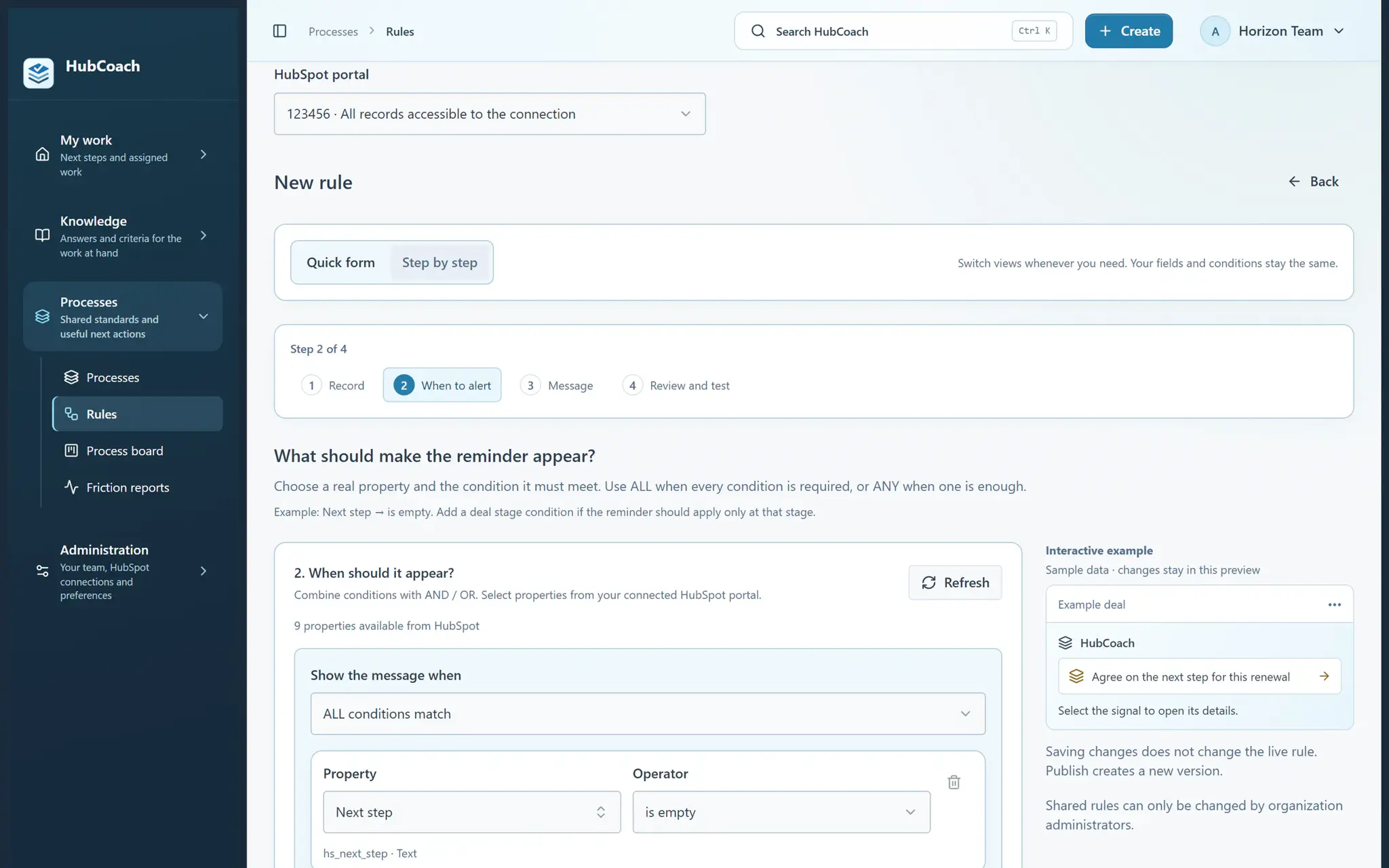
A rule for the empty next step

You choose the object, the condition and the stages. HubCoach shows the notice only on the deals that match.

  • You preview the notice before publishing it.
  • The audience can be the team or a pilot group.
Create your first useful rule
Guided rule creation in the HubCoach web app: step 2 of 4, with the condition Next step is empty on deals and an interactive example of the reminder
A team rule in step-by-step mode, with sample data.
Processes

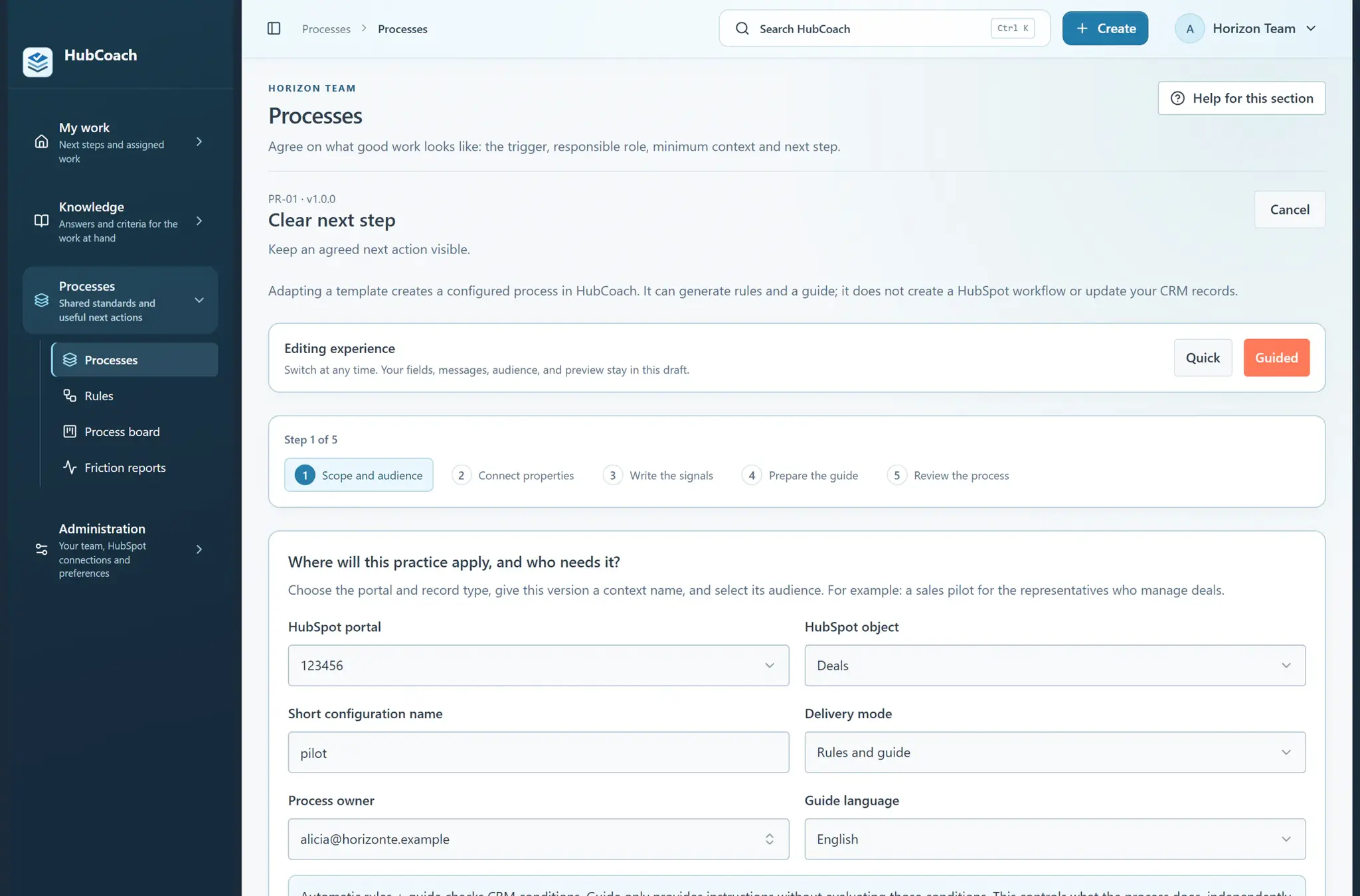
The “Clear next step” template

A guided process brings the follow-up checks together: scope, audience, signals and the guide with the example.

  • It adapts to your portal’s real fields.
  • It does not create HubSpot workflows.
Create a process for a team practice
The Clear next step process template in guided mode: five steps, from scope and audience to reviewing the process, without creating HubSpot workflows
A process template ready to adapt, with sample data.
Getting started

How do you put it in place?

Start with a small pilot and one standard, the way we work with teams in Chile and Latin America.

  1. 01

    Create a process for the stages the team reviews

    For example, Proposal sent and Negotiation. Leave out the stages where a next step does not apply yet.

  2. 02

    Map checks to real fields

    Empty Next step or overdue Close date, with the exact field in your portal.

  3. 03

    Add a guide with an example and an exception

    What good looks like, what could be better and what to do when the customer does not reply.

  4. 04

    Test with one rep and publish to a pilot

    Check the notice on a real deal before opening it to the whole team.

Measuring

How do you know it is working?

Review a sample of active deals before and after the pilot.

  • Does each next step have a useful action, an owner and a date?
  • How many overdue close dates are still unreviewed?
  • Which exceptions repeat, such as deals waiting for a tender?
These are questions for a team review, not a product score. A filled field or a resolved notice does not prove on its own that follow-up improved.
Limits

What does HubCoach not solve?

HubCoach shows the criteria; the decision stays with the team.

  • An empty-value rule detects missing data, not whether the step is useful.
  • The extension agrees nothing with the customer and does not write the step for the person.
  • If the pipeline is set up wrong, that gets fixed in HubSpot.
Roles

Who takes part?

Three roles, each with a clear job in the follow-up.

  • RevOps defines the rule, the process and the example.
  • The rep updates the next step after every conversation.
  • The leader reviews a sample with the team every week.
A person reviews pending work beside a laptop.
Keep reading

Which guides and articles help with this use case?

The next-step guide explains the standard without relying on HubCoach; the articles show how to set it up.

Guides for this use caseHelp articles
A Revenue Hub Latam product

Who is behind HubCoach?

HubCoach is a Revenue Hub Latam product. It grew out of what we solve when we implement and run HubSpot with sales and service teams in Chile and Latin America.

  • Criteria that fade after the training ends.
  • Next steps nobody else can pick up.
  • Handoffs that make the customer repeat their story.
HubSpot Solutions Partner Platinum
HubSpot Platinum Partner in Santiago, ChileWe implement, rescue and run HubSpot for B2B companies.
HubSpot Partner Summit LATAM 2026From the Revenue Hub Latam team that created PortalSync: most-voted pitch, Pitch Contest · HubSpot Partner Summit LATAM 2026, Bogotá.
Frequently asked questions

What do teams ask before using HubCoach?

Does HubCoach detect whether a next step is useful?

No. An empty-value check detects that the information is missing. Your team reviews the quality of the next step with examples and a sample of real deals.

Which deal checks are included?

The 42 checks include several for deals, such as overdue close date, close date approaching with no next activity, deal stalled according to HubSpot and close date postponed repeatedly. Your administrator decides which stay on.

Does HubCoach change the close date for the rep?

No. It shows that the date has passed and opens the field in HubSpot. The person confirms the new date with the customer and saves it themselves.

Can I limit the notice to some pipeline stages?

Yes. The rule defines the object, the conditions and the audience that sees it. That way a deal still in qualification does not get a notice that does not apply yet.

What if the customer has not agreed to anything yet?

Record exactly that: what is missing to agree on it and when you will try. An honest pending step helps more than a made-up date.

Does it work if my team sells in several Latin American countries?

Yes. The rule is set up in HubCoach for the portal you connected, and the help is in Spanish and English. If each country uses its own pipeline, agree on an example for each one.

Waitlist

How do I apply to the waitlist?

Current seats are full. Tell us about your team, in Chile or elsewhere in Latin America, and what you would like it to do better in HubSpot.

  1. You apply with your work email and how many people would use it.
  2. We review the list every 15 days and write to you when there is a seat.
  3. You start with a small group and one concrete process.
Sales follow-up with HubCoach | Revenue Hub Latam