
Practical guide · Rules and signals

Automatic rules in HubSpot: 42 checks and your team’s own in Chile and Latin America

An automatic rule in HubSpot looks at a record and flags when something needs attention: an overdue close date, a ticket with no owner or an empty next step. HubSpot brings required properties and workflows. HubCoach, a Revenue Hub Latam product, adds 42 checks on HubSpot data, personal or team rules for your own criteria, and preferences to decide where help appears. The person always decides and saves in HubSpot.

  • 5 min read
  • Updated October 4, 2026
  • With examples
Guided rule creation in the HubCoach web app: step 2 of 4, with the condition Next step is empty on deals and an interactive example of the reminder
Automatic rulesAt a glance
Baseline
HubCoach’s 42 checks, on from the start
Your own
Personal or team rules, with an audience
Who decides
The administrator, by organization or portal
What they do not do
Edit records or grant permissions
A team rule in step-by-step mode, with sample data.

What are automatic rules in HubSpot?

They are conditions checked on their own against CRM records. Some come with HubSpot and others are added by a tool such as HubCoach. What matters is knowing who acts when the rule is met.

Types of automatic rules in HubSpot
TypeWhat it doesWho acts
Required property in a stageAsks for a field when the deal moves to that stageThe person, when changing stage
HubSpot workflowRuns actions when a record meets conditions, depending on your subscriptionHubSpot
HubCoach checkFlags a situation on native data, such as an overdue dateThe person, who decides and saves
HubCoach team ruleShows the team’s criterion when your conditions are metThe person, with the example in view

Which baseline can your team start with?

HubCoach, a Revenue Hub Latam product, includes 42 checks across deals, contacts, companies, tickets, activities, marketing and aggregates. They start on. An administrator can switch off individual checks, categories or the whole library, and save exceptions for a portal.
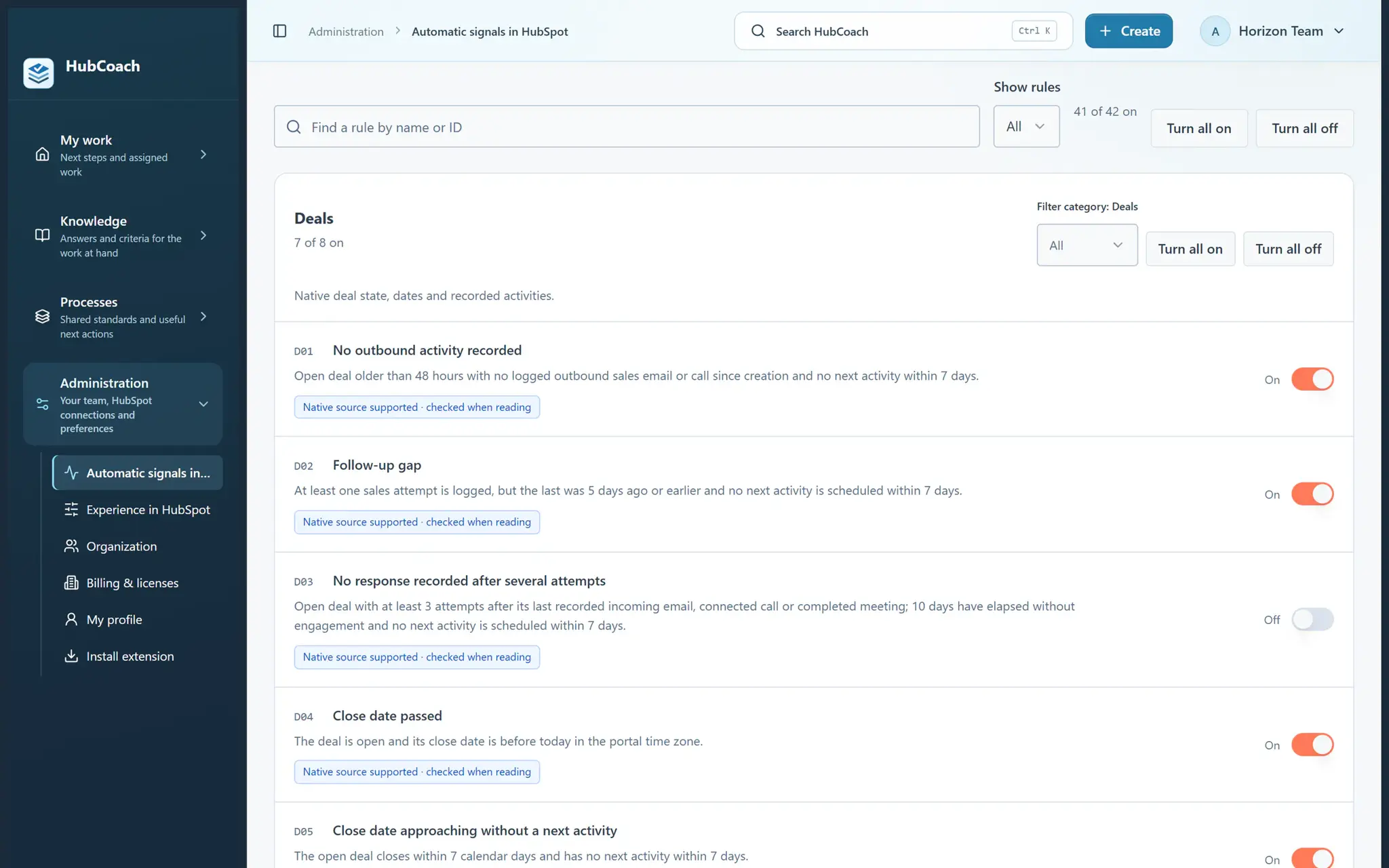
Automatic deal checks with their switches: one was switched off by the organization
The organization decides which checks stay on, with sample data.

An overdue close date gives the rep something concrete to review, but the signal does not decide a new date: the person confirms the customer’s situation and saves the change in HubSpot. Checks depend on the data and permissions available.

When should your team add a rule of its own?

When the criterion is yours rather than HubSpot’s: what a deal in Proposal sent must have, what to check before passing a lead or what to confirm before closing a ticket. For example, requiring the company’s tax ID before quoting in Chile, or the tender number on public sector deals in Latin America.

  1. Choose the object and the conditionFor example, deals with an empty Next step.
  2. Write the notice with an exampleWhat is missing, why it matters and what good looks like.
  3. Choose the audienceJust you, a pilot group or the whole team.
  4. Test before publishingCheck the notice on a real record.
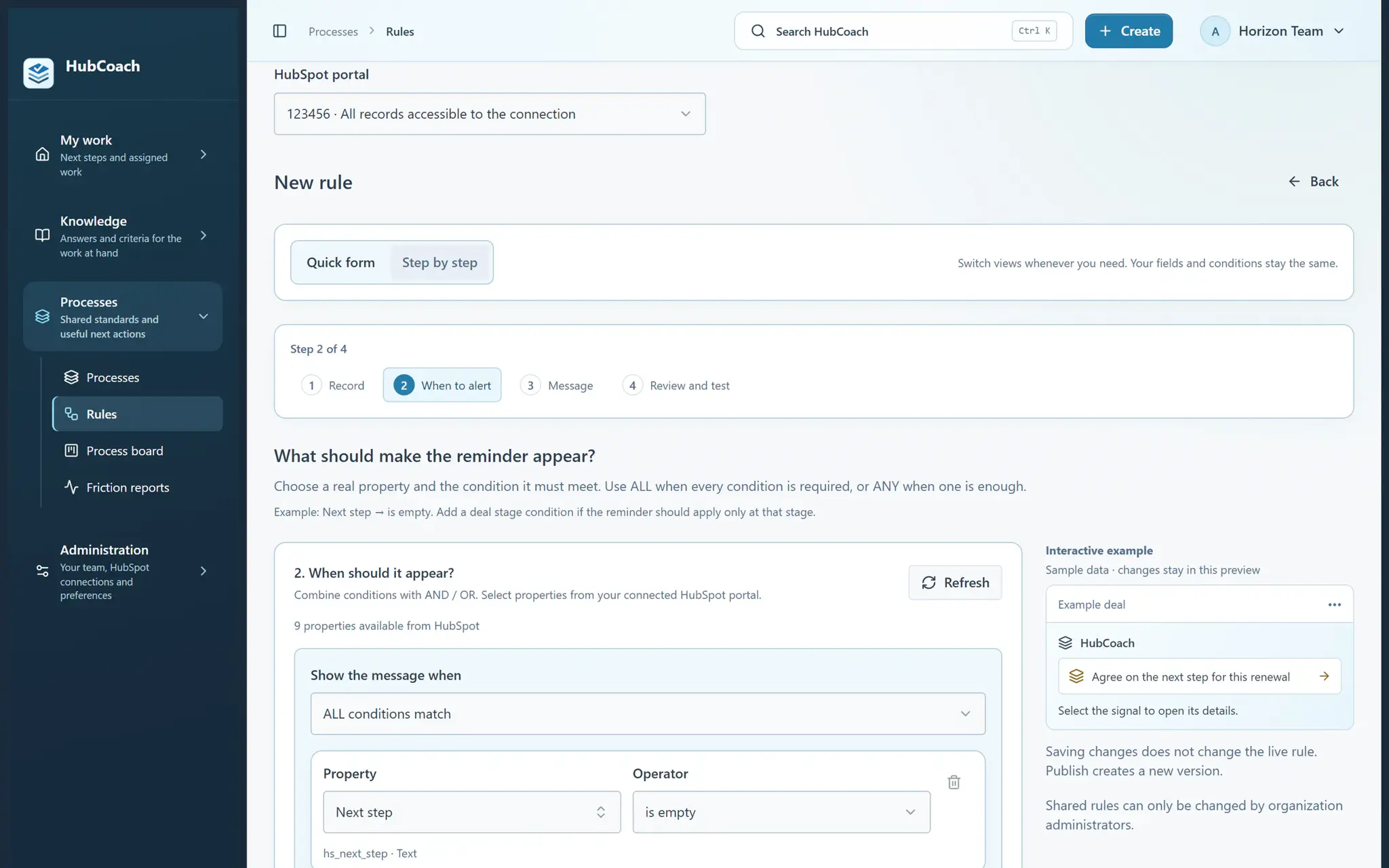
Guided rule creation in the HubCoach web app: step 2 of 4, with the condition Next step is empty on deals and an interactive example of the reminder
A team rule in step-by-step mode, with sample data.
  • Useful notice

    “The next step is missing. Write the action, the owner and the date agreed with the customer. Example: send the proposal on Thursday.”

  • Could be better

    “Fill in the field.” It does not say why or how.

Why do a rep and a leader need different help?

A rep may keep a personal rule for their own follow-up. An administrator publishes shared criteria to a defined audience. They are different things, and each has its place.

Language, density and surfaces are saved for each person; organization policies still govern the shared experience. Explain the reason for each signal and the next useful action so the help feels relevant.

How do you move from noticing an issue to resolving it?

On supported records, lists and boards, signals highlight pending work. The Side Panel brings the explanation, knowledge and assigned steps to the record. Supported actions open native HubSpot controls; the person reviews and saves.

Two people agree on an idea beside a notebook in an office.

Leaders can revisit saved views and assigned plans with the team. Review a few real records to understand what improved and what is still hard. A read or a completed step measures activity; it does not guarantee a commercial result.

How do you start with a first group?

Choose a small group, one concrete process and the checks that help it act. It is how we recommend teams in Chile and Latin America get started. When your organization receives access, that group starts with a 7-day trial.

Current seats are full: apply to the waitlist. We review applications every 15 days, and no payment is collected during this early access stage.

What should you review this week?

  • Choose one team and one frequent decision.
  • Review the checks and switch off the ones that do not apply to your portal.
  • Publish the shared rules to the right audience.
  • Let each person adjust their personal rules and preferences.
  • Review records and exceptions together after the pilot.
Frequently asked questions

What else do teams ask about automatic rules in HubSpot?

Can each person switch off the organization’s checks?

Administrators manage organization and portal policies. Members keep personal rules and preferences within those policies.

Does applying start the trial?

No. The 7 days start when your organization is admitted and enabled. Applying does not create a paid subscription.

Do HubCoach rules replace HubSpot workflows?

No. A workflow runs automatic actions in HubSpot. A HubCoach rule shows the criterion and the person decides; it does not edit records or block changes.

Can a rule check associated contacts, companies or tickets?

Yes. A rule can be based on associated records, for example a deal’s company, without copying fields between objects. The steps are in the help center.

Can I test a rule before publishing it?

Yes. Saving, testing and publishing are separate steps: you can check the notice on a real record before the team receives it.

What if a check does not apply to my portal?

The administrator switches it off for the organization or just for that portal. If the data or the permission is missing, the check simply produces no signal.

Is HubCoach available in Spanish?

Yes. The app, the extension and the notices are in Spanish and English, and each person chooses their language. We built it in Santiago for teams in Chile and Latin America that work in HubSpot.

A Revenue Hub Latam product

Who is behind HubCoach?

HubCoach is a Revenue Hub Latam product. It grew out of what we solve when we implement and run HubSpot with sales and service teams in Chile and Latin America.

  • Criteria that fade after the training ends.
  • Next steps nobody else can pick up.
  • Handoffs that make the customer repeat their story.
HubSpot Solutions Partner Platinum
HubSpot Platinum Partner in Santiago, ChileWe implement, rescue and run HubSpot for B2B companies.
HubSpot Partner Summit LATAM 2026From the Revenue Hub Latam team that created PortalSync: most-voted pitch, Pitch Contest · HubSpot Partner Summit LATAM 2026, Bogotá.
Waitlist

Want HubCoach to bring this to every record?

HubCoach shows your team’s criteria next to the HubSpot record where the decision happens, in Spanish or English, for teams in Chile and Latin America.

  1. You apply with your work email and how many people would use it.
  2. We review the list every 15 days and write to you when there is a seat.
  3. You start with a small group and one concrete process.
Automatic rules in HubSpot | Revenue Hub Latam