
Practical guide · Sales and service

Sales-to-service handoff in HubSpot: what to have ready before it happens in Chile and Latin America

Define the sales-to-service handoff as an operational agreement: who sends it, what triggers it, which information travels with it, who receives it and what confirms acceptance. Then map that agreement to the records, guidance and assigned work your teams use in HubSpot. Closing the deal does not finish the handoff: a team that can start without asking again does.

  • 5 min read
  • Updated October 4, 2026
  • With examples
The Clear next step process template in guided mode: five steps, from scope and audience to reviewing the process, without creating HubSpot workflows
Sales-to-service handoffAt a glance
What it is
An agreement between who sends and who receives
Minimum context
What was sold, what was promised, dates and contact
Acceptance
The receiver confirms, or returns a missing item
Before reminders
Associations, permissions and transfer in HubSpot
A process template ready to adapt, with sample data.

What is the sales-to-service handoff?

It is the moment a customer moves from the team that sold to the team that will serve or implement, as happens in B2B software and service companies in Chile and Latin America. In HubSpot it usually matches a won deal, but closing a deal and starting service are not the same event.

A won deal may still lack a confirmed scope, an onboarding contact or a delivery commitment. If the receiving team has to ask sales to explain the case again, the stage change did not finish the handoff.

Where does the handoff actually fail?

Before creating a rule or a form, walk through a recent case together.

  1. Pick a handoff from the last few weeksOne that was hard, not the easiest one.
  2. Ask what information service neededAnd where it was stored when they looked for it.
  3. Find what delayed the first useful actionSeparate what was missing from what existed but was hard to find.

What belongs in a minimum handoff agreement?

Specify the trigger, who sends, who receives and the expected first action. Choose each field because someone needs it to act, not because a form can hold it.

Elements of a minimum handoff agreement
ElementExample
TriggerDeal won with a signed contract
Who sends and who receivesAccount executive and implementation lead
What was sold and promisedThree pipelines and a training on the 10th
Dates and contactKickoff next week; contact: head of operations
Open issuesERP and Chilean e-invoicing integration, still to be confirmed
First service actionKickoff meeting this week

What must be solved in HubSpot first?

  • Which record does the next team open? The deal, the company or an onboarding ticket.
  • Can they see the relevant information? Check the receiver’s permissions.
  • Are the associations in place? Deal notes do not become ticket context just because the deal was won.
  • Does the data transfer work? If it depends on an integration, test it with a real case.

How can you support and review the handoff?

Publish a short guide with an example of a complete handoff and one that should be returned.

  • Complete

    Scope, dated commitments, the contact who decides and the first action. Service starts the same day.

  • Send back

    “Customer closed, see emails”. The scope is missing and nobody knows what was promised.

In HubCoach, a Revenue Hub Latam product, a process brings together the record checks and the handoff instructions. An assigned action plan defines one person’s work, including confirming receipt.
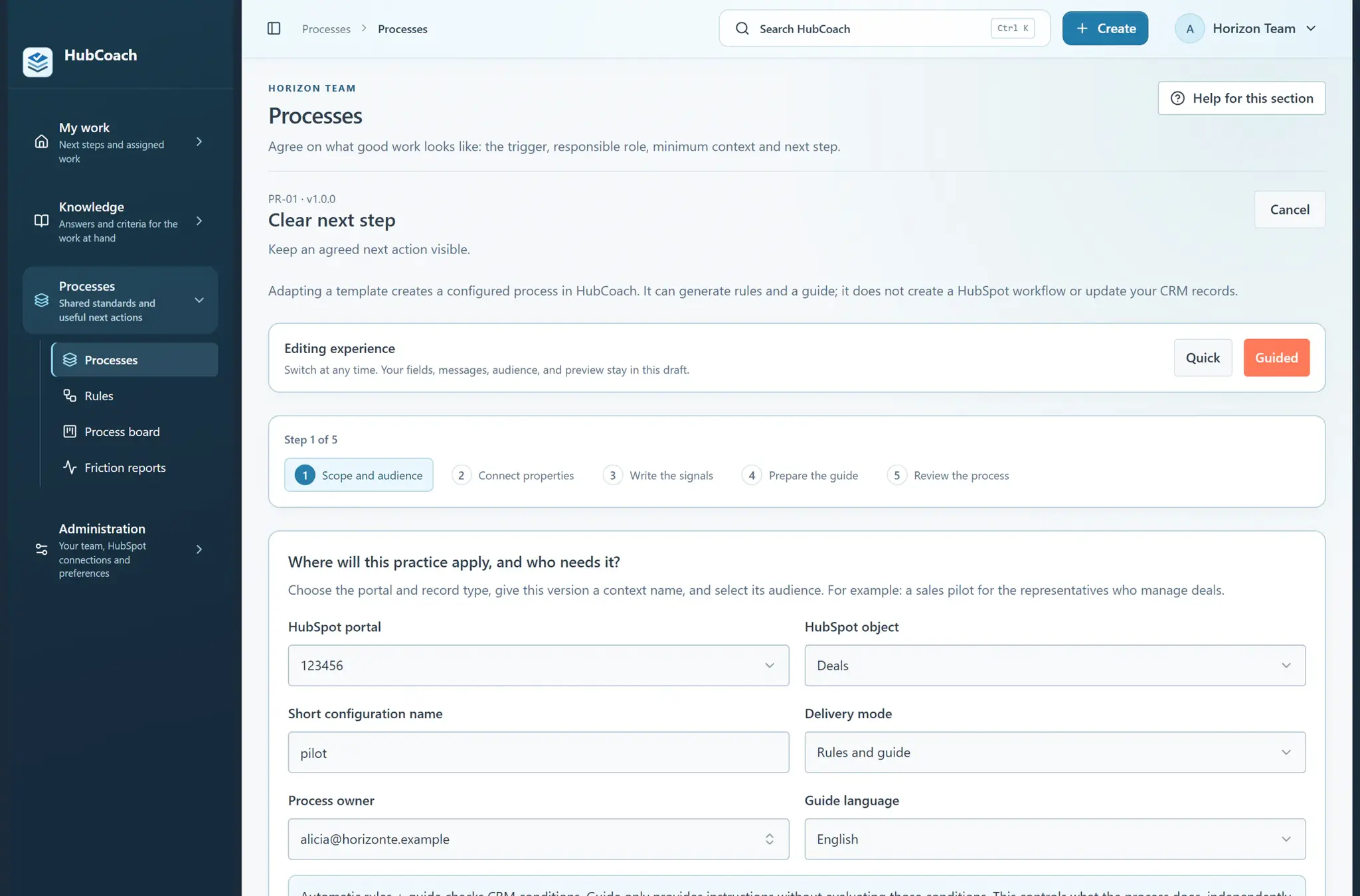
The Clear next step process template in guided mode: five steps, from scope and audience to reviewing the process, without creating HubSpot workflows
A process template ready to adapt, with sample data.

During a pilot, check whether service could start without repeating questions to the customer. Plan progress and reads are activity; the receiving team’s ability to act is a separate observation. The guide sits next to the record, with the real fields in boxes.
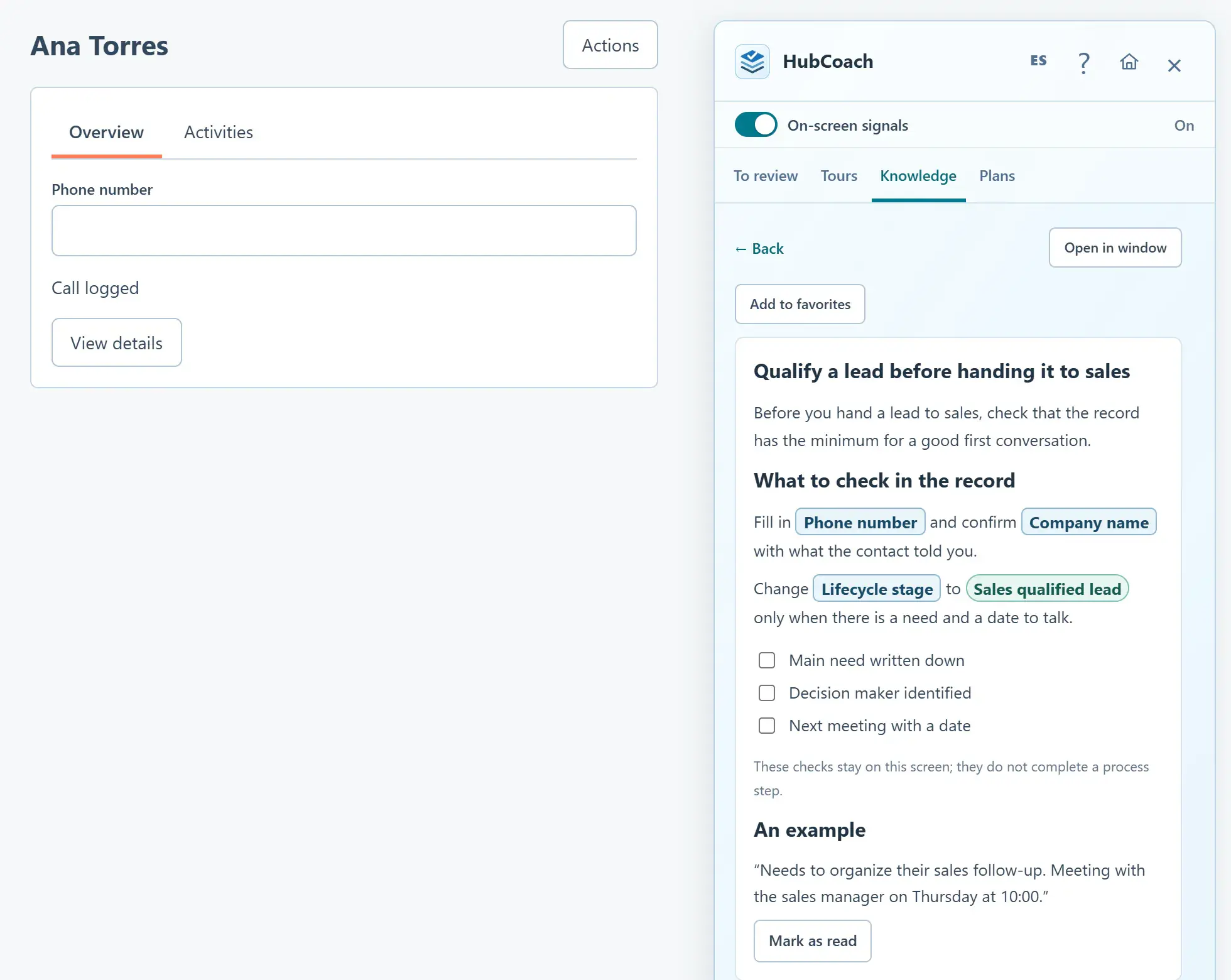
A Knowledge article open in the Side Panel next to a contact: real HubSpot fields such as Phone number and Lifecycle stage appear in boxes
An article with real HubSpot fields next to the record, with sample data.

What should you review this week?

  • Agree on the event that makes a case ready to hand over.
  • Name the sending and receiving roles.
  • Define only the context the receiver needs to start.
  • Verify access and information transfer on a real case.
  • Record acceptance or a specific exception with an owner.
Frequently asked questions

What else do teams ask about the sales-to-service handoff?

Does marking a deal as won complete the handoff?

Only if your teams defined that event as enough and the receiver has the context they need. A stage change on its own does not confirm that delivery can start.

Does HubCoach copy notes from deals to tickets?

No. It provides guidance, supported checks and action plans. The associations or information transfer you need are configured separately in HubSpot.

Who confirms that the handoff was accepted?

The person who receives the case. They can confirm they are ready to start or return a specific missing item, with an owner to resolve it.

How much information should sales hand over?

Only what service needs to start: what was sold, what was promised, dates, contact and open issues. A long form nobody reads does not improve the handoff.

What happens when service spots a sales opportunity?

That is the handoff in the opposite direction. The guide from customer service to sales in HubSpot explains how to send it back to sales without losing context.

Do I need an integration for a good handoff?

Not always. If all the information lives in HubSpot, correct associations and permissions are enough. If it comes from another system, solve the integration first; Revenue Hub Latam implements them for teams in Chile and Latin America.

What changes if service is delivered by a team in another country?

The agreement is the same, but it is worth writing more carefully: in teams spread between Chile and other Latin American countries, the receiver can rarely ask in the hallway. The minimum context has to live in the HubSpot record.

A Revenue Hub Latam product

Who is behind HubCoach?

HubCoach is a Revenue Hub Latam product. It grew out of what we solve when we implement and run HubSpot with sales and service teams in Chile and Latin America.

  • Criteria that fade after the training ends.
  • Next steps nobody else can pick up.
  • Handoffs that make the customer repeat their story.
HubSpot Solutions Partner Platinum
HubSpot Platinum Partner in Santiago, ChileWe implement, rescue and run HubSpot for B2B companies.
HubSpot Partner Summit LATAM 2026From the Revenue Hub Latam team that created PortalSync: most-voted pitch, Pitch Contest · HubSpot Partner Summit LATAM 2026, Bogotá.
Waitlist

Want HubCoach to bring this to every record?

HubCoach shows your team’s criteria next to the HubSpot record where the decision happens, in Spanish or English, for teams in Chile and Latin America.

  1. You apply with your work email and how many people would use it.
  2. We review the list every 15 days and write to you when there is a seat.
  3. You start with a small group and one concrete process.
Sales-to-service handoff in HubSpot | Revenue Hub Latam