
Practical guide · Onboarding and enablement

Contextual enablement in HubSpot: training inside the record in Chile and Latin America

Contextual enablement gives a person the criterion, the example and the next action they need at a real moment of work inside HubSpot. Start by diagnosing why the action is hard. Then combine practical guidance next to the record, a chance to apply it and a later review of the real result.

  • 5 min read
  • Updated October 4, 2026
  • With examples
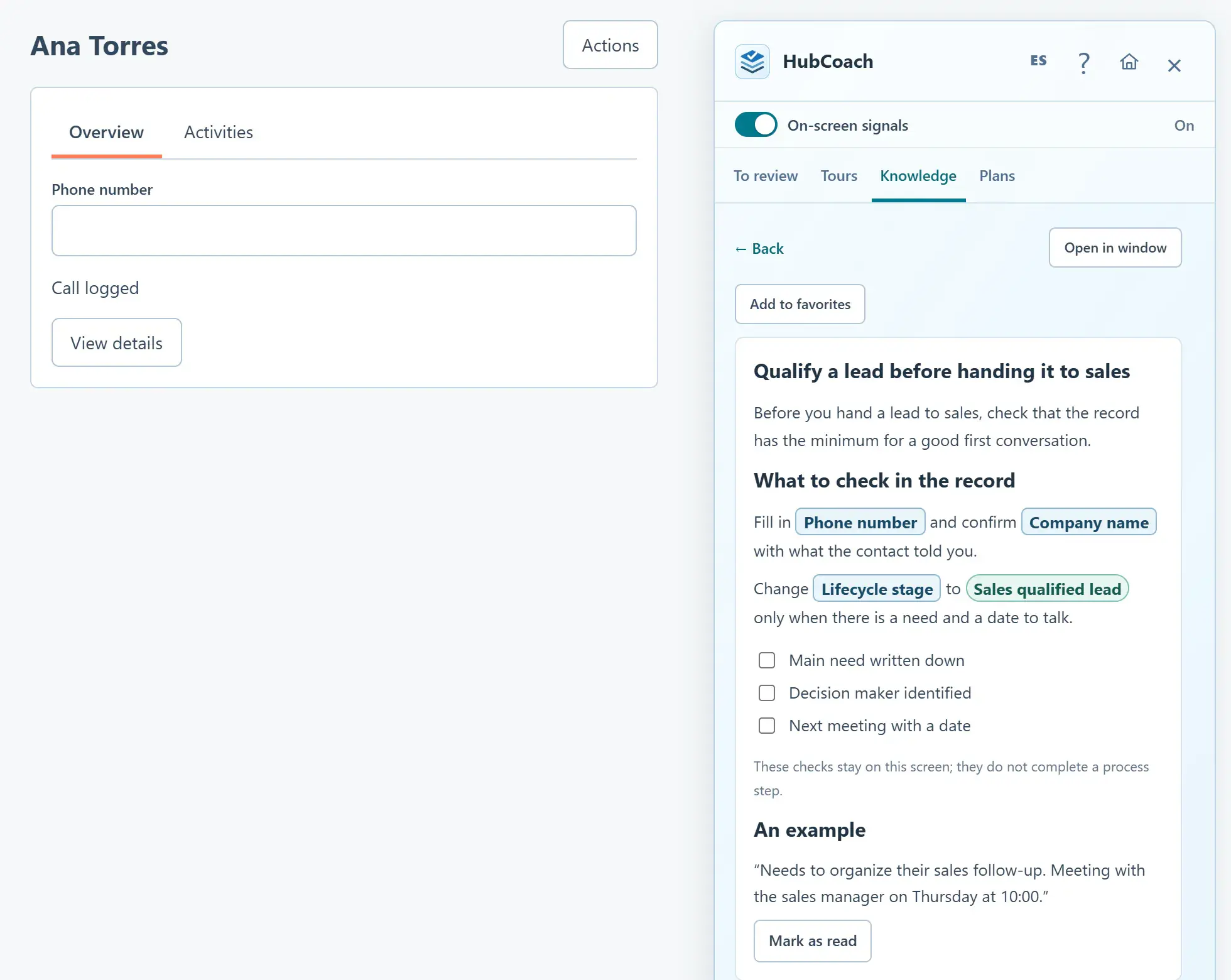
A Knowledge article open in the Side Panel next to a contact: real HubSpot fields such as Phone number and Lifecycle stage appear in boxes
Contextual enablementAt a glance
What it is
Help at the moment of the decision, not before
What it includes
Criterion, example, exception and next action
How to practice
A representative case and feedback
How to review
A real execution, and another one later
An article with real HubSpot fields next to the record, with sample data.

What is contextual enablement in HubSpot?

It is training inside the work: help appears next to the HubSpot record when the person has to decide, not only in a training session weeks earlier.

Traditional training and contextual enablement
Traditional trainingContextual enablement
WhenBefore startingAt the moment of the decision
WhereA room, a video or a manualNext to the HubSpot record
What it teachesWhere to clickWhich option fits and why
How it is reviewedAttendance or a quizA real execution, over time

It does not replace the initial training: it continues it when new cases and process changes appear. It works the same for a team in Santiago, Chile, as for one spread across several Latin American countries.

Why do questions continue after training?

Knowing where to click is different from knowing which option fits a customer. A person may remember the screen and still be unsure whether a request qualifies as an opportunity, when to change stage or what the next team needs.

Repeated questions are useful for diagnosis. Ask for the situation behind the question and watch the work.

  • Unclear criteria. Two people would answer differently with the same information.
  • Conflicting instructions. The manual says one thing and the leader another.
  • Missing permissions. The person knows what to do but cannot do it.
  • Double entry. They already recorded the same thing in another system.

What makes a piece of guidance useful?

Keep one decision at the center. Say when the guidance applies, what to do, why it matters and what evidence to leave. Add a good example and a plausible exception, and keep more detail one click away without turning the instruction into a manual.

  • Explains the interface

    “Complete this property”.

  • Explains the work

    “Record the agreed action so a colleague can continue the conversation. Example: send the proposal on Thursday, owner: you.”
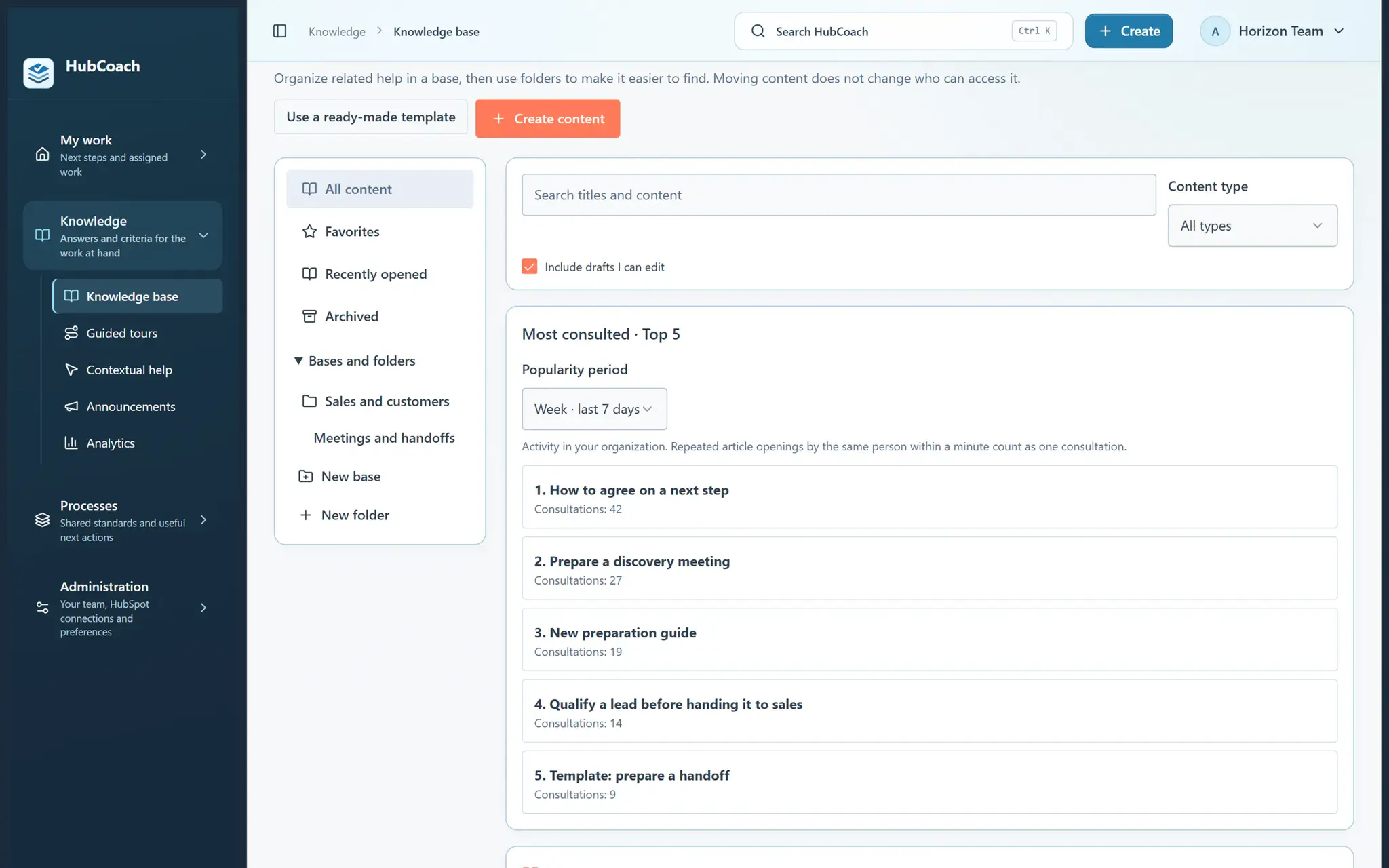
HubCoach knowledge base with folders, favorites and the Most consulted block for the last 7 days
The team's knowledge base, with sample data.

How should practice and feedback work?

  1. Choose one role and one frequent decisionOne that happens often enough to review.
  2. Work through a representative caseAnd talk about the reasoning, not just the result.
  3. Fix the guide if the example is confusingAn ambiguity you find is an improvement, not the person’s mistake.
  4. Review a real executionAnd come back to the same behavior later.

A completed reading, an exercise, a checked step and a well-handled CRM record are different levels of evidence. Do not use the first as a substitute for the last.

When does a tour fit, and when does an article?

Which format to choose for each question
If the question is…Use
Where something is done in the portalA guided tour, step by step on the screen
Which option fits this customerAn article with a criterion, an example and an exception
What is missing on this recordA rule that shows the notice next to the record
Which steps a person must completeAn assigned action plan

HubCoach guided tours show the way on each person’s screen; they do the real action.
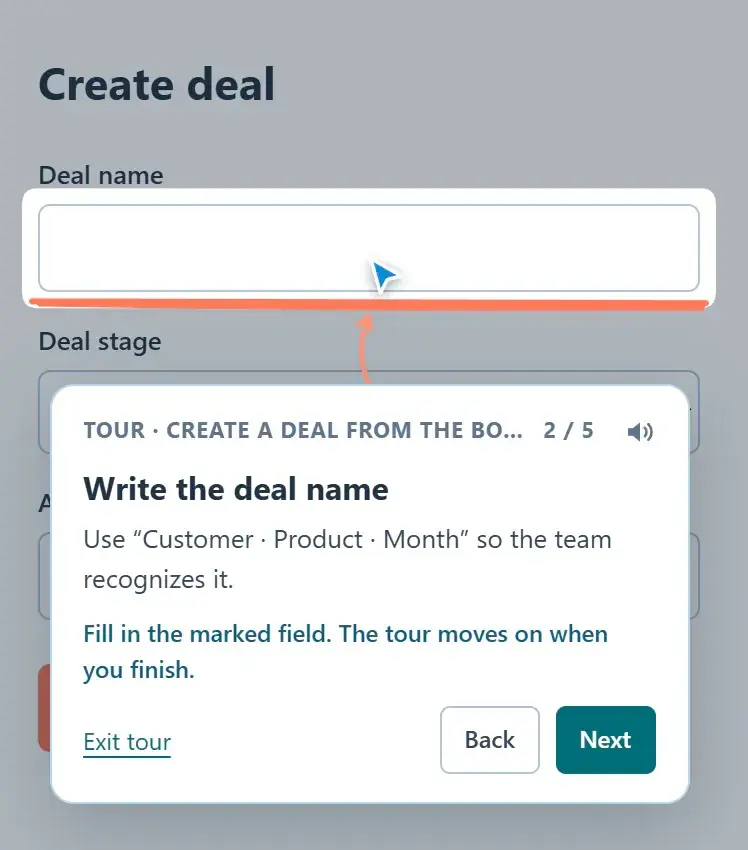
Guided tour at step 2 of 5: the balloon asks for the deal name and highlights the field in the create form
A step-by-step guided tour, with sample data.

Where does HubCoach fit?

With HubCoach, a Revenue Hub Latam product, knowledge cards and guides are available in the Side Panel, next to the record. Contextual help sits beside the field where it is supported. A rule fits when the condition can be checked with CRM data; a plan, when a person needs assigned steps.

What should you review this week?

  • Choose one role and one real decision.
  • Observe whether the obstacle is knowledge, judgment or working conditions.
  • Write a short criterion, a useful example and an exception.
  • Practice, review a real case and look at the behavior again later.
  • Update the guide when recurring friction shows it needs to change.
Frequently asked questions

What else do teams ask about contextual enablement in HubSpot?

Is contextual enablement the same as onboarding?

Onboarding helps someone get started. Contextual enablement also supports decisions during ongoing work, including new situations and process changes after the initial training.

Should every error create another reminder?

No. First check the cause and whether the existing instruction is useful. Fix access, double entry, integration problems or unclear ownership when those are what prevents the action.

Which decisions should we cover first?

The ones people make often and that generate the most questions: qualifying an opportunity, changing stage or preparing a handoff. Start with one and add more once it works.

How much text should contextual guidance have?

Little: the decision, why it matters, an example and an exception. The detail goes in an expandable section or a linked article, so the record stays visible.

Does it work for remote teams?

Yes. The help lives next to the HubSpot record, so it reaches people the same way in Santiago or any other city in Latin America, without an in-person session.

How do I know the enablement worked?

By reviewing a real execution after practice and another one later. Reads and completed steps are activity; the well-handled record is the evidence.

Which language should the help be written in?

The language your team works in. The HubCoach app and extension are in Spanish and English, and tours can be written in both, which helps teams in Chile and Latin America that also serve customers in English.

A Revenue Hub Latam product

Who is behind HubCoach?

HubCoach is a Revenue Hub Latam product. It grew out of what we solve when we implement and run HubSpot with sales and service teams in Chile and Latin America.

  • Criteria that fade after the training ends.
  • Next steps nobody else can pick up.
  • Handoffs that make the customer repeat their story.
HubSpot Solutions Partner Platinum
HubSpot Platinum Partner in Santiago, ChileWe implement, rescue and run HubSpot for B2B companies.
HubSpot Partner Summit LATAM 2026From the Revenue Hub Latam team that created PortalSync: most-voted pitch, Pitch Contest · HubSpot Partner Summit LATAM 2026, Bogotá.
Waitlist

Want HubCoach to bring this to every record?

HubCoach shows your team’s criteria next to the HubSpot record where the decision happens, in Spanish or English, for teams in Chile and Latin America.

  1. You apply with your work email and how many people would use it.
  2. We review the list every 15 days and write to you when there is a seat.
  3. You start with a small group and one concrete process.
Contextual enablement in HubSpot | Revenue Hub Latam